
Summarize:


We Reviewed the Top 7 Billtrust Alternatives for Smarter Accounts Receivable Management
This guide breaks down the top 7 Billtrust alternatives: Lunos, Tabs, HighRadius, Versapay, Esker, Invoiced, and Zoho Invoice.


Quick Summary
This guide breaks down the top 7 Billtrust alternatives: Lunos, Tabs, HighRadius, Versapay, Esker, Invoiced, and Zoho Invoice.
Here are our top three picks:
Looking for the Best Billtrust Alternative for Your Team?
Billtrust is a well-known name in accounts receivable automation. But as invoice volumes grow and payment cycles stretch, many AR and finance teams are hitting their limits. Rigid workflows, scattered customer communication, and time-consuming manual follow-ups make it harder to stay on top of collections and maintain healthy cash flow.
In this Lunos article, we’ll break down the top 7 Billtrust alternatives, compare their strengths and limitations, and help you identify which tool fits your workflows best.
Why Listen to Us?
At Lunos, we’ve helped numerous businesses simplify their accounts receivable workflows, reduce manual follow-ups, and accelerate collections using AI-driven automation. For Accounting Revela, that meant faster collections and zero AR days.
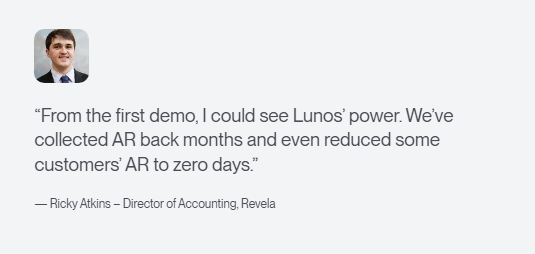
This review draws directly from that hands-on expertise, giving you a clear, practical, and unbiased breakdown of the best Billtrust alternatives on the market today.
What is Billtrust?
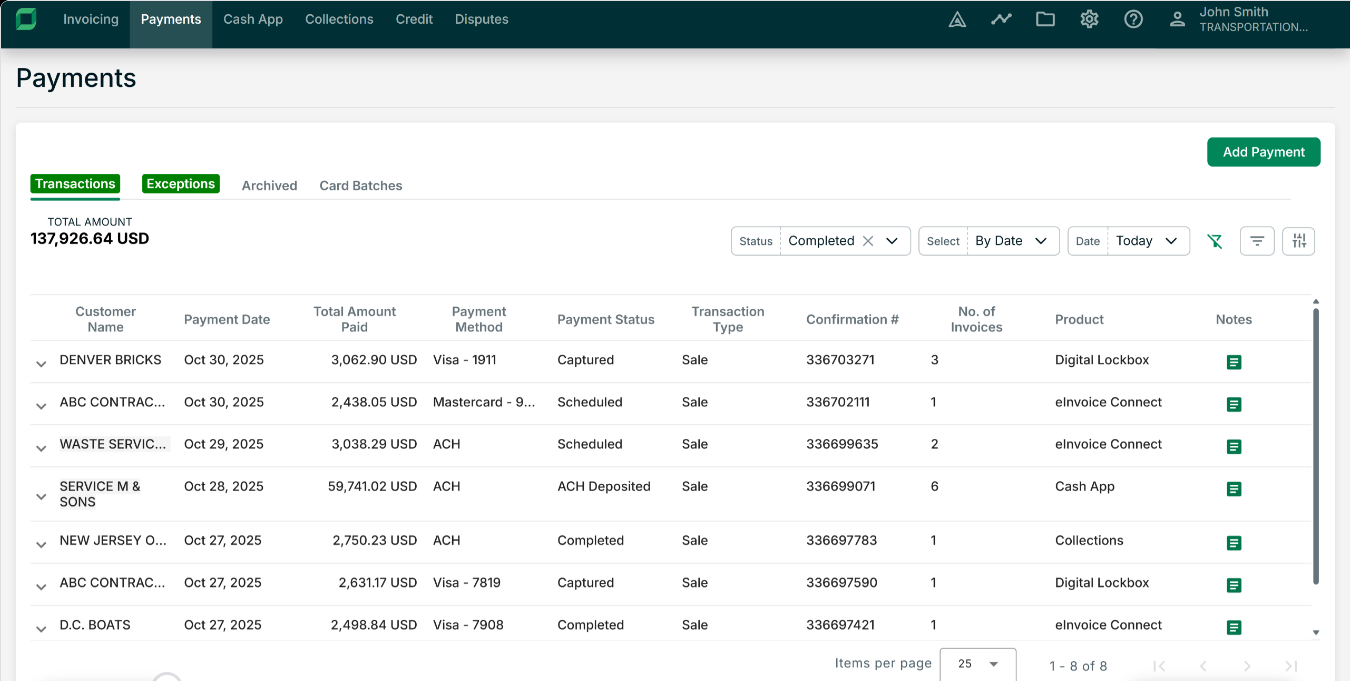
Billtrust is an accounts receivable automation platform that helps businesses streamline invoicing and payment collection. It automates tasks like invoicing, reminders, and payment tracking to improve cash flow while reducing manual effort.
Key Features
- Automated invoicing: Sends invoices across multiple channels, ensuring timely and accurate billing.
- AI-powered cash application: Automatically matches payments to invoices, even with partial payments or complex remittances.
- Flexible payment options: Supports several payment methods to accelerate collections and improve customer experience.
- Intelligent collections: Automates reminders and follow-ups on overdue invoices to reduce days sales outstanding (DSO).
- Real-time analytics and reporting: Provides visibility into AR performance, cash flow trends, and payment behaviors.
Limitations of Billtrust
- Limited payment options: Fewer payment methods compared to some modern AR solutions.
- Frequent login issues: Users experience repeated logins and forced logouts, which disrupt workflows.
- Slow performance: Delayed data loads and balance updates affect efficiency.
- Weak OCR capabilities: Documents often need manual corrections, reducing automation benefits.
7 Top Billtrust Alternatives For Businesses
Here’s a quick comparison of the alternatives.
1. Lunos
The first on the list is our tool, Lunos.
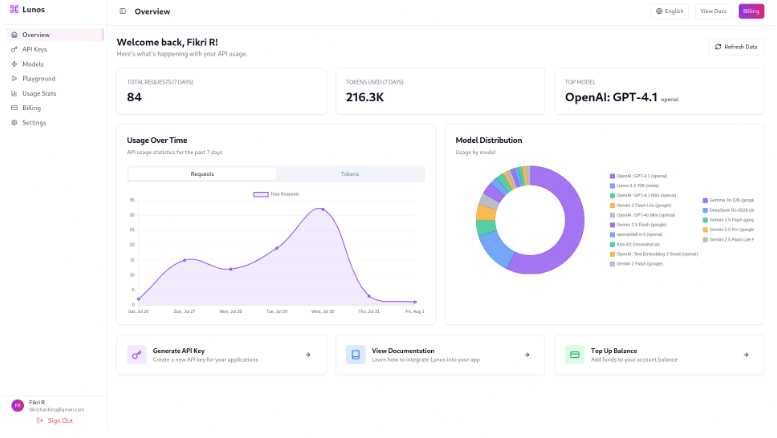
Lunos is a modern accounts receivable platform designed to handle AR workflows the way a human would. Unlike traditional rule-based automation, Lunos reads customer messages, tracks promises to pay, sends follow-ups, and adapts to each interaction.
By centralizing AR data across tools like NetSuite, Xero, QuickBooks, Salesforce, and HubSpot, it helps finance teams get paid faster without adding headcount or increasing manual effort.
Key Features
- Customer communication automation: Handles customer messages, tracks payment commitments, and sends automated follow-ups.
- Adaptive follow-ups: Adjusts follow-up actions based on real-time customer interactions.
- Seamless integration: Syncs AR data across ERP, CRM, and payment systems for a unified view.
- 24/7 operations: Manages accounts receivable around the clock, ensuring no follow-ups are missed.
- Payment reminder personalization: Sends tailored payment reminders based on each customer’s payment patterns and relationship history.
- Real-time insights: Gives on-the-spot visibility into your accounts receivable process, with AI-driven insights for better cash flow predictions.
Pricing
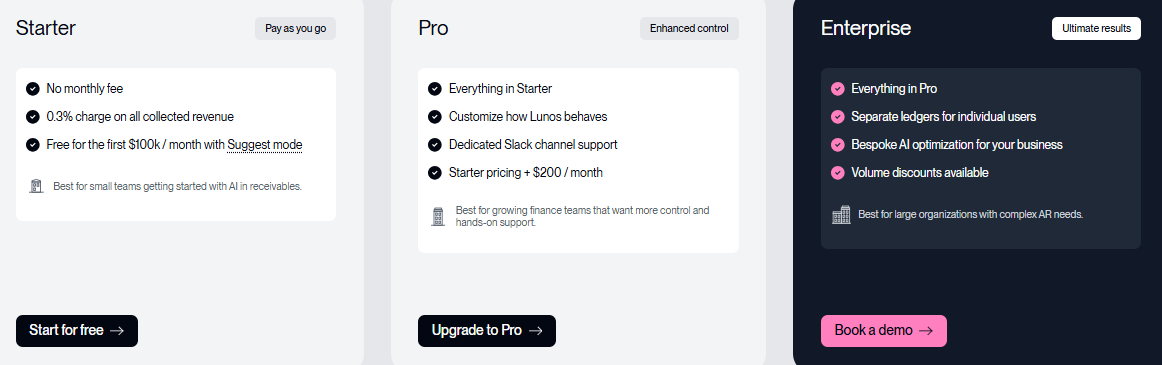
- Starter: No monthly fee (pay-as-you-go). Free for the first $100k per month with Suggest Mode, with a 0.3% fee on collected revenue.
- Pro: $200/month + 0.3% of collections. Includes everything in Starter plus dedicated Slack support, additional configuration options, and more control.
- Enterprise: Custom pricing. Offers advanced features like multi-entity support, tailored AI optimization, volume discounts, and more.
Pros
- Simplifies daily workflows with no manual tracking of emails or payment promises
- Reduces oversight errors by keeping all invoice conversations in one centralized dashboard
- Responds and adapts naturally to customer replies, reducing confusion or missed follow-ups
- Frees finance teams from repetitive tasks without losing control
- Provides clear visibility with easy-to-read dashboards for AR status
Cons
- Custom pricing for enterprise plans requires direct contact
2. Tabs
Tabs is an accounts receivable automation platform designed to help businesses speed up collections and reduce DSO. It automates invoice reminders, payment tracking, and dispute resolution while providing analytics and integration with ERP and CRM systems for streamlined operations.
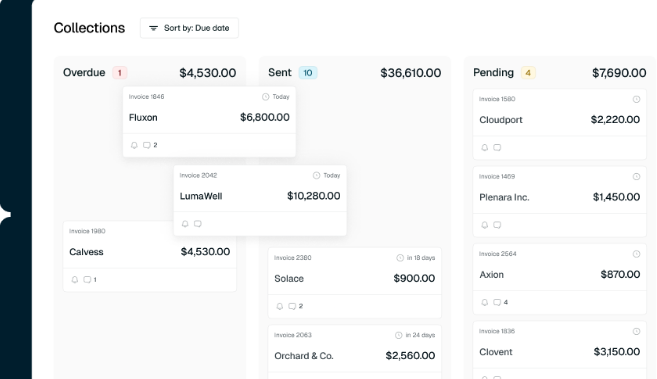
Key Features
- Customer revenue automation: Generates invoices directly from signed contracts with no manual entry.
- Flexible billing models support: Handles subscriptions, usage‑based billing, metered billing, or hybrid plans.
- Automated collections and dunning: Sends reminders, embeds payment links, and manages overdue invoices.
- Built‑in revenue recognition: Ensures accurate accounting across billing cycles.
- Real‑time reporting: Enables tracking of invoiced amounts, payments, AR balances, and cash flow.
Pricing
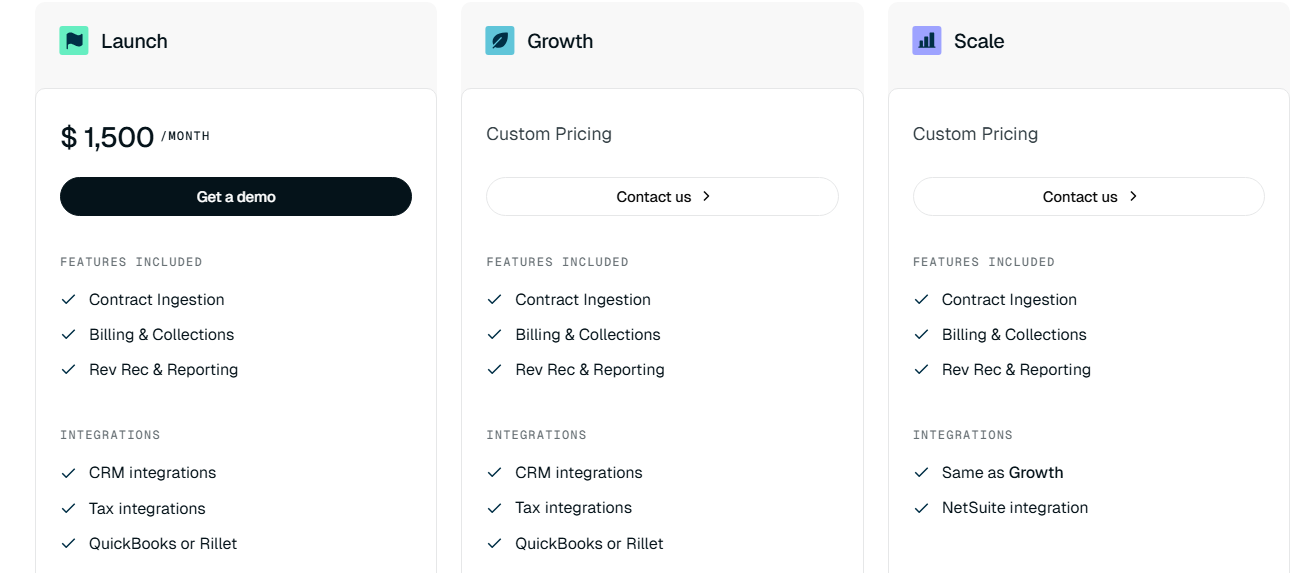
- Launch: $1,500/month. Includes contract ingestion, billing & collections, revenue recognition, and reporting.
- Growth / Scale / Enterprise: Custom pricing. Contact sales for plans tailored to your usage, integrations, and company size.
Pros
- Reduces manual work by generating invoices automatically from contracts
- Flexible billing supports a variety of business models without extra setup
- Built‑in revenue recognition keeps financials audit‑ready with minimal effort
Cons
- Billing for ad‑hoc discounts and terminations may require manual adjustments
- May be more complex than needed for small teams or simple invoicing needs
3. HighRadius
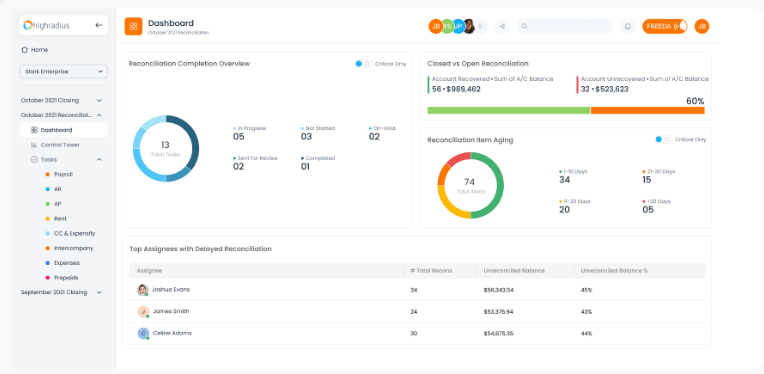
HighRadius is a comprehensive accounts receivable solution for larger businesses. It automates tasks like invoicing, cash application, and collections to improve accuracy and provide real-time insight into cash flow and risk. The platform is designed to support high-volume environments where control, data visibility, and process consistency matter.
Key Features
- AI‑driven cash application: Automatically matches incoming payments with open invoices.
- Automated collections prioritization: Identifies and ranks high‑risk or high‑value accounts.
- Credit and collections automation: Manages credit risk, overdue invoices, and follow‑ups in one system.
- E‑invoicing and electronic billing: Sends invoices digitally and supports multiple payment options.
- AR forecasting and analytics: Uses historical data to predict cash flow and payment timing.
Pricing
HighRadius offers custom pricing based on factors such as company size, selected modules, and transaction volume.
Pros
- Reduces manual reconciliation workload and speeds up payment matching
- Helps teams focus on the right accounts with smart prioritization
- Centralizes credit and collections activity in one system
Cons
- Requires a long setup period and substantial internal training
- Can be overwhelming for small businesses with simple AR needs.
4. Versapay
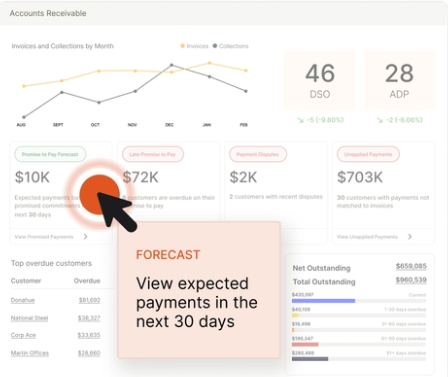
Versapay is a billing and accounts receivable platform built for businesses seeking a smoother invoice‑to‑cash process. It sends invoices, tracks payments, and manages collections from one place. A built-in customer portal lets buyers handle invoices and payments on their own, reducing back-and-forth with the finance team.
Key Features
- Invoice‑to‑cash automation: Generates and sends invoices, then tracks payments until cash is collected.
- Customer self‑service portal: Lets customers view invoices and pay online to speed up collections.
- Automated payment reminders: Sends reminders to customers with overdue invoices to nudge payment.
- Payment method flexibility: Supports multiple payment options to make it easier for customers to pay.
- Integrated collections management: Combines billing, payments, and collections tracking in one system.
Pricing
Versapay offers custom pricing based on factors like company size, selected modules, and transaction volume.
Pros
- Invoice‑to‑cash automation for moving billing to payment without manual steps
- Reduces email back-and-forth by giving customers a clear place to pay and check invoices
- Improves visibility into payment activity without leaving the platform
Cons
- Self‑service portal approach can reduce direct control over customer communication
- Multiple payment methods can complicate reconciliation
5. Esker
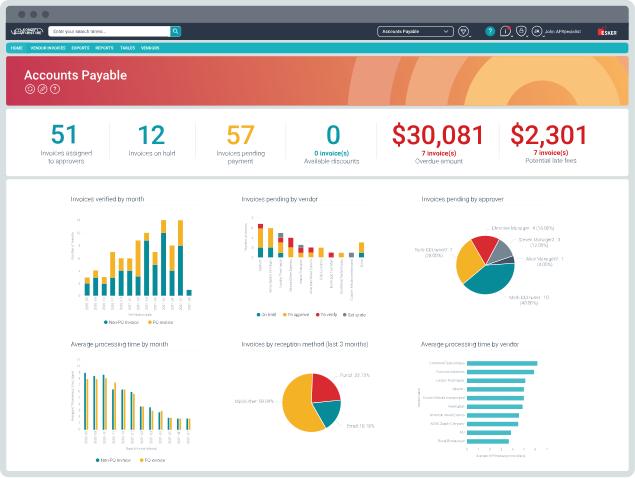
Esker is a cloud‑based accounts receivable platform that handles invoice delivery, cash application, credit management, and collections for businesses of any size. The tool lets companies send paper or e‑invoices, track payments, and monitor AR performance through centralized dashboards. Esker works well for firms with high invoice volume or complex billing needs.
Key Features
- Invoice delivery automation: Sends invoices in multiple formats to suit customer preferences.
- AI‑powered cash application: Matches incoming payments with outstanding invoices automatically.
- Collections management automation: Sends payment reminders, flags overdue accounts, and helps prioritize collections tasks.
- Credit risk monitoring: Evaluates customer credit risk and monitors exposure to help avoid bad debts.
- Claims and deductions handling: Manages customer disputes or deductions through digital workflows.
Pricing
Esker offers custom pricing based on company size, chosen modules, invoice volume, and scope of implementation.
Pros
- Saves time on manual matching by handling large payment volumes smoothly
- Credit risk monitoring helps spot risky customers before they cause issues
- Reduces inbox clutter by centralizing communication and tasks
Cons
- Changes to workflows may require support or admin help
- Some tasks still feel process-heavy compared to more conversation-driven tools
6. Invoiced
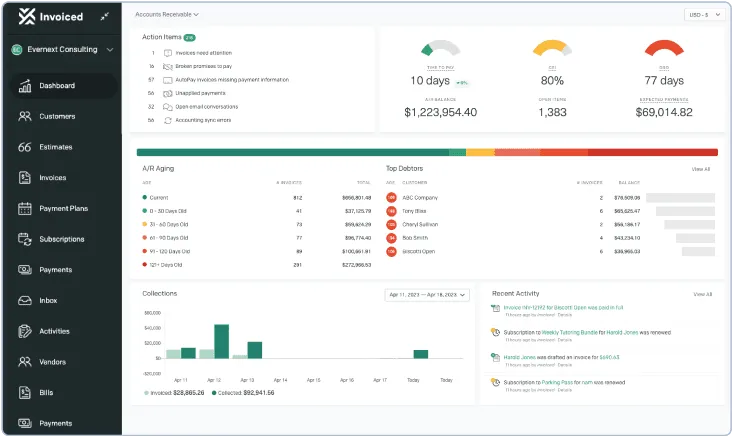
Invoiced is an accounts receivable platform that automates billing and collections for medium to large businesses. Ideal for finance teams looking to reduce manual tasks and improve cash flow visibility, the platform simplifies invoicing, payment tracking, and follow-ups.
Key Features
- Automated invoicing and billing: Creates and sends invoices automatically, reducing manual billing tasks.
- Online payment processing: Lets customers pay via credit card, ACH, or other methods.
- Automated payment reminders: Sends reminders and follow-ups for overdue invoices.
- Customer self‑service portal: Allows customers to view invoices and payment history, improving transparency.
- Customizable invoice templates: Offers flexible invoice designs for branding and presentation.
Pricing
Invoiced offers custom pricing based on factors such as business size, required features, and transaction volume.
Pros
- Reduces manual billing so teams can focus on exceptions and strategy
- Customer portal improves transparency and encourages faster payments
- Customizable invoices help maintain brand consistency and professionalism
Cons
- Some payment methods may incur extra fees
- Limited advanced AR automation compared with enterprise tools
7. Zoho Invoice
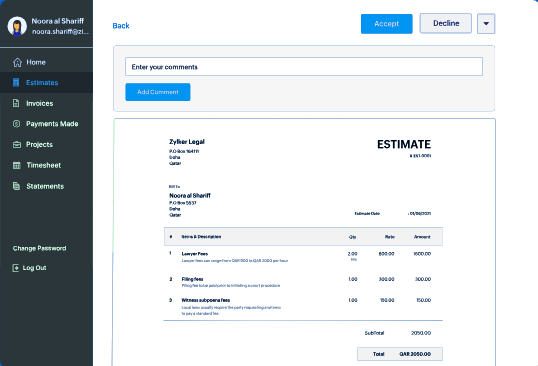
Zoho Invoice is an online invoicing tool for small to medium businesses. It helps create and send invoices, track payments, and send payment reminders. It’s a good fit for startups or small teams that want a simple, low‑cost way to manage billing without heavy overhead.
Key Features
- Customizable invoice templates: Lets you create professional invoices with fully customizable templates to match your brand's style.
- Recurring invoices & automated billing: Automates the invoicing process by scheduling and sending recurring invoices.
- Automated payment reminders: Sends timely reminders to clients for upcoming or overdue payments.
- Online payments and multiple payment options: Provides easy online payment methods via cards, bank transfers, and more.
- Time and expense tracking: Tracks billable hours and expenses, converting them into invoices.
Pricing
Zoho Invoice is free.
Pros
- Recurring invoices and automated billing save time on repeated tasks
- Online payments and multiple payment options for simplified payments
- Time and expense tracking help bill services and costs accurately
Cons
- Reporting and analytics are basic compared with full AR platforms
- Not ideal for businesses needing complex collections or enterprise AR tools
Simplify Your Accounts Receivable Management With Lunos
Each tool on this list has its strengths, but if you’re looking for a modern AR platform that works like a human, reading messages, sending follow-ups, tracking intent, and running your AR process end-to-end, Lunos stands out as a more comprehensive solution.
By combining two-way intelligence, seamless integrations, and 24/7 autonomous workflows, our platform helps finance teams collect payments faster, reduce DSO, and eliminate repetitive tasks that slow down operations.
Ready to modernize your AR without increasing costs? Get started with Lunos for free.
Make your receivables effortless and focus on what you do best