

Summarize:


Billtrust vs. YayPay: Which AR Platform Is Right for You? [2026]
Billtrust and YayPay are both established accounts receivable platforms, each with dedicated user bases in the B2B space. However, if you're evaluating AR automation tools, you may be wondering: "Billtrust vs. YayPay: which is better?"Each platform takes a different approach to solving receivables challenges and targets different market segments.


Billtrust and YayPay are both established accounts receivable platforms, each with dedicated user bases in the B2B space. However, if you're evaluating AR automation tools, you may be wondering: "Billtrust vs. YayPay: which is better?"
Each platform takes a different approach to solving receivables challenges and targets different market segments.
While both serve their purpose well, there’s a better alternative in Lunos.
Why Listen to Us?
We've worked with finance teams managing everything from 500 to 50,000 invoices per month. We've seen what real automation looks like versus what just looks good in a demo. Too many AR platforms promise to "automate collections" but instead your team still does all the actual work of chasing responses, tracking promises, and handling disputes.
This comparison is based on hands-on experience with real AR workflows, not just vendor marketing materials.
Billtrust vs. YayPay: The Quick Version
What is Billtrust?
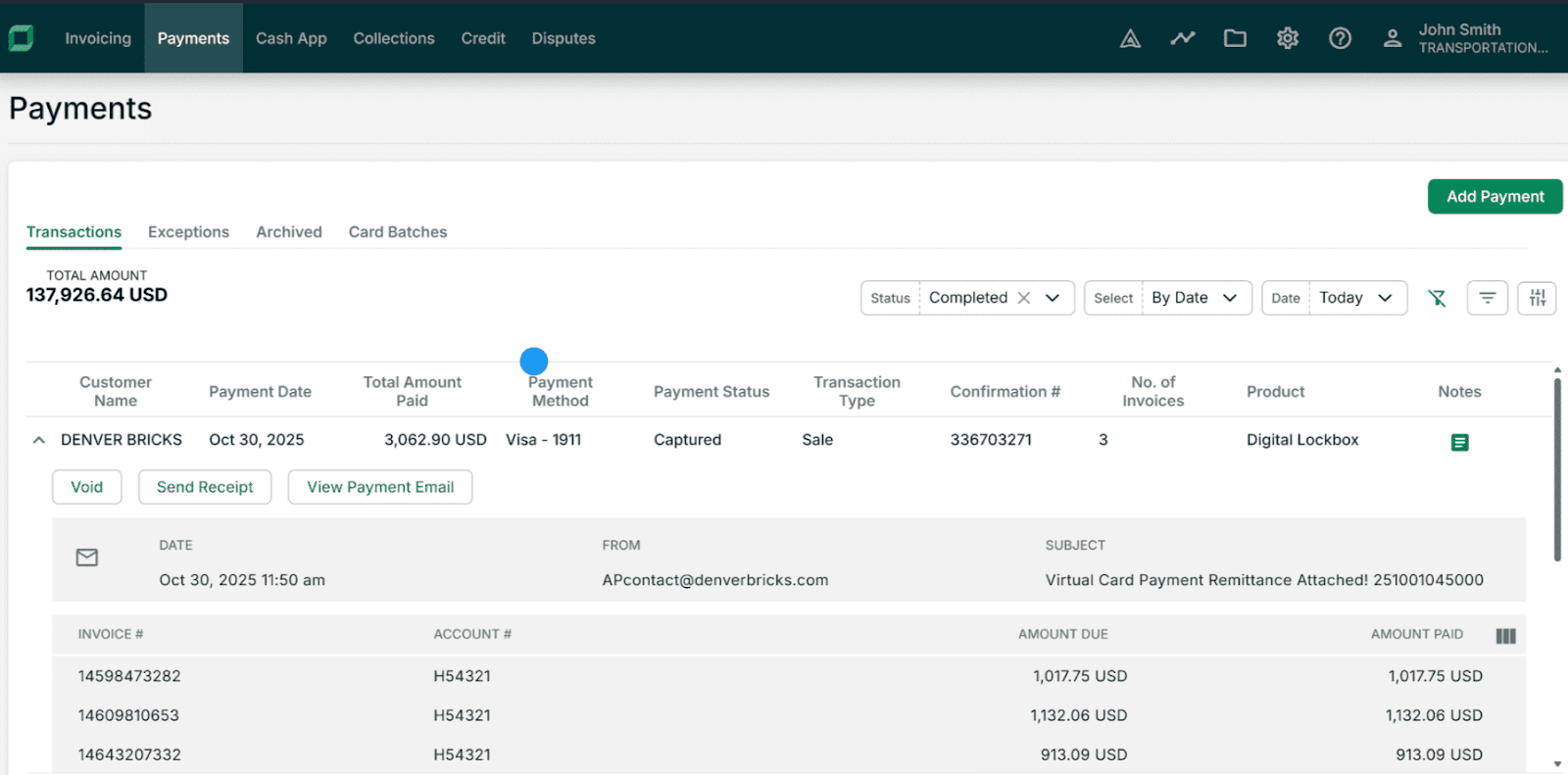
Think of Billtrust as the payment infrastructure specialist. It focuses on making it easier for customers to pay you by digitizing invoices, setting up payment portals, and handling cash applications.
The platform helps B2B companies move away from paper invoicing and creates self-service payment options for customers. But here's where it gets tricky: Billtrust doesn't do much for the collections side of things. Your team still needs to handle follow-ups, dispute conversations, and payment promises manually.
- Best for: Mid-market to enterprise B2B companies that want professional payment portals and need to digitize their invoice delivery.
- Key strengths: Really good at reducing manual payment processing, strong cash application features.
- Main drawbacks: Focuses on the payment experience rather than the collections conversation. Limited intelligence for handling customer communications.
- Pricing: Custom pricing. You'll need to book a demo or contact sales.
Billtrust functions primarily as invoice-to-cash software, focusing on invoice delivery, payment portals, and cash application
What is YayPay (Now Quadient)?
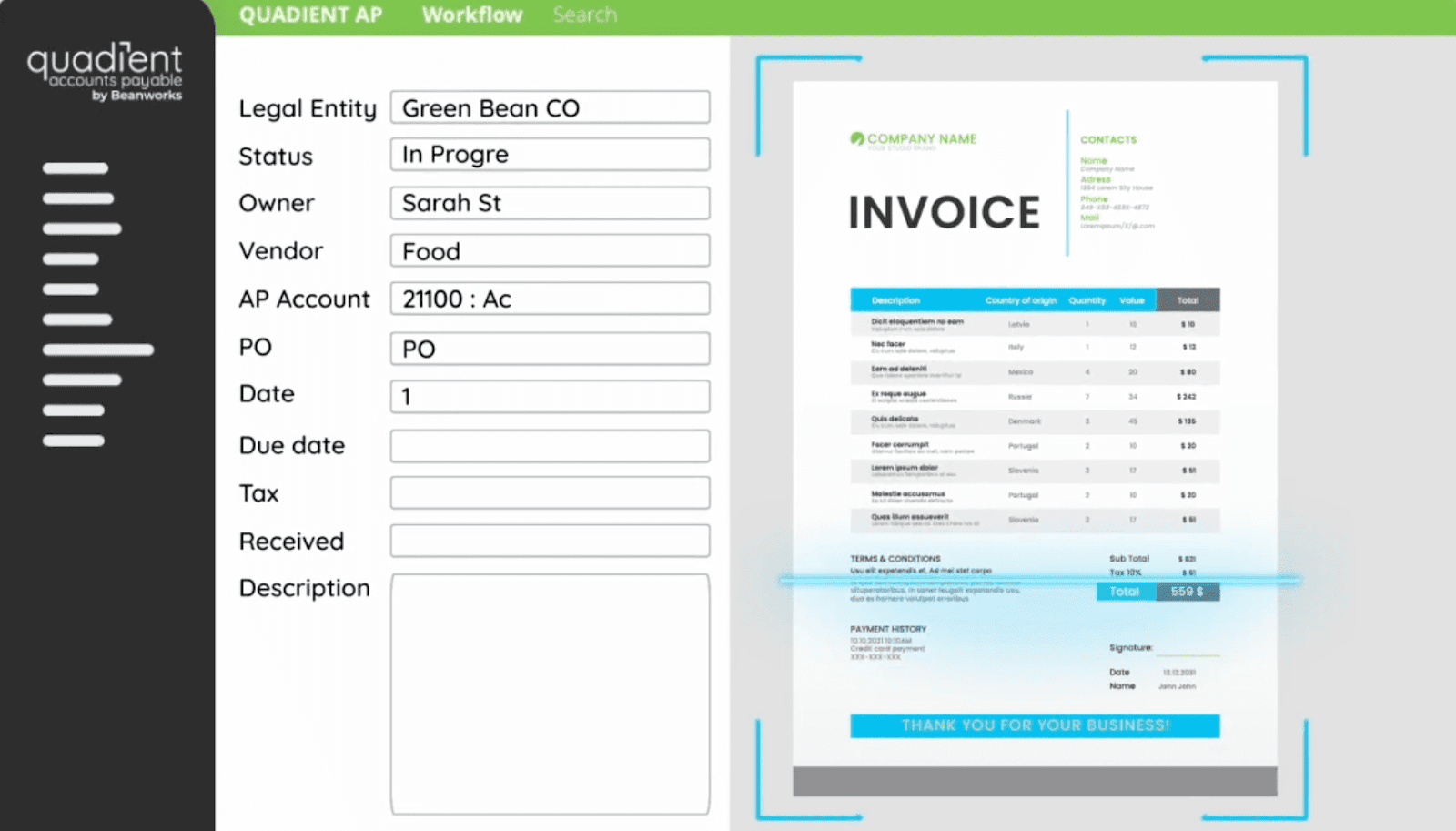
YayPay (acquired by Quadient in 2019) positions itself as a more accessible alternative to expensive enterprise AR platforms. It's designed for mid-market B2B companies and focuses on cash forecasting, collections automation, and workflow management.
The platform uses AI for predictive cash flow analytics and lets you set up automated dunning sequences. It integrates well with popular accounting systems and has a clean interface.
- Best for: Mid-market B2B companies (especially if you're using NetSuite or Sage Intacct) that want to automate collections workflows and get better cash forecasting.
- Pricing: Custom pricing. Book a demo or contact sales.
- Key strengths: Solid cash flow forecasting, good integrations with mid-market ERPs, and collaborative tools for collections teams.
- Main drawbacks: Still relies on rules and templates for automation. Can't actually understand or respond to customer replies. The predictive features need historical data to work well.
YayPay sits somewhere between basic AR tools and enterprise platforms, but it still uses that traditional automation approach where you're constantly jumping in to handle exceptions.
Billtrust vs. YayPay: Side-by-Side Comparison
Here's a quick table to make the differences easier to see:
Now let's dig into what these differences actually mean for your day-to-day operations.
1. Core Philosophy: What Problem Are They Really Solving?
Both approach different parts of the cash collection cycle, from invoice delivery to payment and follow-up.
Billtrust's Approach
Billtrust sees AR as a payment-friction problem.
Their solution?
Make it ridiculously easy for customers to pay you. Digital invoices, slick payment portals, multiple payment options, the whole nine yards.
Billtrust’s approach works great if your customers actually want to pay but find the process annoying. But if your customers are dealing with cash flow issues, billing disputes, or just need reminders and follow-up? That's still on your team to handle.
YayPay's Approach
YayPay treats AR as a workflow and forecasting challenge. They automate your collection sequences, predict when cash is coming in, and help you manage follow-ups more efficiently.
The problem?
It's still rigid, rules-based automation. If a customer sends a nuanced response or their situation changes, YayPay can't adapt. Your team still needs to step in and handle the actual conversation.
What to choose:
- Billtrust: If payment friction is your main bottleneck.
- YayPay: If you need better workflows and cash forecasting.
2. Pricing: What's This Actually Going to Cost?
Billtrust
Expect to pay between $20,000 and $60,000 per year, depending on your invoice volume and the modules you need. There are also transaction-based fees on top of that.
Implementation typically takes 3–6 months because you're integrating with your enterprise resource planning (ERP) and payment systems and configuring everything. When you factor in licensing, setup costs, payment processing fees, and ongoing operational expenses, the total cost of ownership adds up.
YayPay
YayPay targets mid-market companies with annual pricing ranging from $15,000 to $40,000. Implementation takes 2–4 months, including required integrations and training.
Worth noting: some users have reported that pricing has gotten more complex and contracts more restrictive since Quadient took over. While it's positioned as the more affordable option, make sure you understand exactly what you're getting before signing.
What to choose:
- Billtrust: If you've got a budget of $20,000-$60,000+ and need enterprise-grade payment infrastructure.
- YayPay: If you're in the $15,000-$40,000 range, forecasting is a priority.
3. Collections Automation: Can They Actually Handle Customer Conversations?
This is where traditional AR automation software really shows its limitations.
Billtrust
Billtrust prioritizes payment infrastructure over collections communication. It'll automate invoice delivery and send reminders.
But when customers respond?
Customer replies don't get processed by the system. Your team still needs to manually track disputes and payment promises and determine when to follow up next. While it streamlines the payment process, it doesn't reduce the ongoing collections workload.
YayPay
YayPay has stronger collections automation with customizable dunning sequences, templates, and workflow rules. You can trigger reminders based on aging, customer segments, and payment history.
But here's the catch: it's all rules-based. The system can't read between the lines, understand context, or adapt to what customers actually say. When someone replies with "I'll pay half now and half in 2 weeks," you're back to manual intervention.
What to choose:
- Billtrust: If getting customers to use payment portals will genuinely reduce your collections workload.
- YayPay: If you want structured workflows with template-based automation.
4. Payment Processing: Who Does It Better?
Billtrust
This is where Billtrust really shines. Their payment processing infrastructure is polished—great customer portals, multiple payment methods, and strong cash application automation. They handle billions in B2B payments, so they know what they're doing.
If you have high payment volume and need to make it as easy as possible for customers to pay, Billtrust's infrastructure can significantly reduce manual work.
YayPay
YayPay offers basic payment processing, but it's not its forte. Cash application is simpler and often requires manual matching for complex payments.
Their strength is forecasting when payments will arrive, not in managing the payment mechanics. They focus more on what happens before payment rather than the transaction itself.
What to choose:
- Billtrust: If robust payment processing is critical for your business.
- YayPay: If collections workflows matter more than payment infrastructure.
5. Cash Forecasting: How Well Can You Predict Cash Flow?
Billtrust
Billtrust provides basic cash forecasting based on invoice aging and payment patterns. The reporting focuses on payment trends, portal adoption rates, and delivery metrics.
You'll get good insights into which customers are using digital payments and where friction points exist. But the forecasting itself is pretty straightforward. No sophisticated predictive AI-powered modeling.
YayPay
This is YayPay's standout feature. Their AI-driven cash flow forecasting uses historical payment patterns to predict collection timing, which is particularly helpful for CFOs forecasting cash.
Accuracy depends on your data quality, however. And it can't account for what customers actually tell you-payment promises, disputes, or changing circumstances. The reporting is strong, and the interface is cleaner than many enterprise tools.
What to choose:
- Billtrust: For payment infrastructure analytics and portal adoption tracking.
- YayPay: For AI-powered cash forecasting and collections metrics.
6. Integration: How Hard Is This to Set Up?
Billtrust
Billtrust integrates with major ERPs like NetSuite, SAP, Oracle, Microsoft Dynamics, and QuickBooks. It also connects to payment processors and banking systems.
The implementation requires real technical resources for API integration, data migration, and customer portal setup. The work is substantial because Billtrust interfaces with multiple systems, including your ERP, payment processing, banking, and customer communication.
YayPay
YayPay has strong integrations with mid-market ERPs, particularly NetSuite and Sage Intacct. It also connects to QuickBooks, Xero, and Microsoft Dynamics.
Implementation is slightly faster than Billtrust (2–4 months vs. 3–6 months) because the scope is more focused on collections workflows than full payment infrastructure. You still need technical integration and data mapping.
What to choose:
- Billtrust: If you have technical resources for complex payment infrastructure integration.
- YayPay: For faster implementation with ERP-focused integrations.
Can't Decide? There's a Third Option: Lunos
Here's the thing about both Billtrust and YayPay: they're built on an outdated assumption that AR automation means automating processes and systems.
But that's not where the real work happens. The real work is in the conversations. It’s in reading customer responses, understanding payment commitments, identifying disputes, and tailoring follow-up based on context.
That's what Lunos does differently.
As AI in accounts receivable matures, teams are moving beyond rules-based automation toward systems that understand conversations.

Lunos is an AI coworker for accounts receivable that handles customer follow-ups and collections like an actual human team member would. While Billtrust and YayPay send automated reminders, Lunos:
- Reads customer responses and understands what they actually mean
- Tracks payment promises and follows up at the right time
- Identifies disputes and routes them to the right person
- Adapts follow-ups based on relationship history and customer behavior
Finance teams stay in control with 3 autonomy modes: Monitor (review everything), Suggest (approve recommendations), and Act (let Lunos handle routine tasks). All collaboration happens right in Slack, so there's no new system to learn.
Teams using Lunos typically see about a 75% reduction in AR workload, with significant DSO improvement within weeks of going live.
Features That Actually Make a Difference
Two-Way Conversational Intelligence
Lunos doesn't just send messages. It reads and understands responses. If a customer commits to paying next week, Lunos schedules the follow-up for that date and records the promise for forecasting. For disputes, it automatically loops in the right team member.
Adaptive Follow-Up Management
Every interaction adjusts based on the customer's tone, history, and payment behavior. You get personalized messages instead of generic templates, which strengthens relationships while improving collection results.
Slack-Native Workflow
Your team can approve actions, review daily summaries, and collaborate right in Slack. No new interface to learn, no complicated training sessions.
Multi-System Integration
Lunos connects with ERPs like QuickBooks and NetSuite, CRMs like Salesforce and HubSpot, and payment systems—all in one place. Information syncs automatically, so you don't have to coordinate between systems manually.
Three Autonomy Modes
You control the level of independence Lunos has. Monitor mode lets you review everything before it goes out. Suggest mode has Lunos propose actions for your approval. Act mode handles routine follow-ups automatically, only flagging exceptions.
Complete Audit Trail
Every message, commitment, and status update is tracked in real time for accurate forecasting and compliance.
Faster Implementation
And unlike traditional AR platforms, Lunos doesn't require months-long implementation. Most teams report going live in as little as 2–4 weeks and without requiring dedicated IT resources.
Lunos Pricing
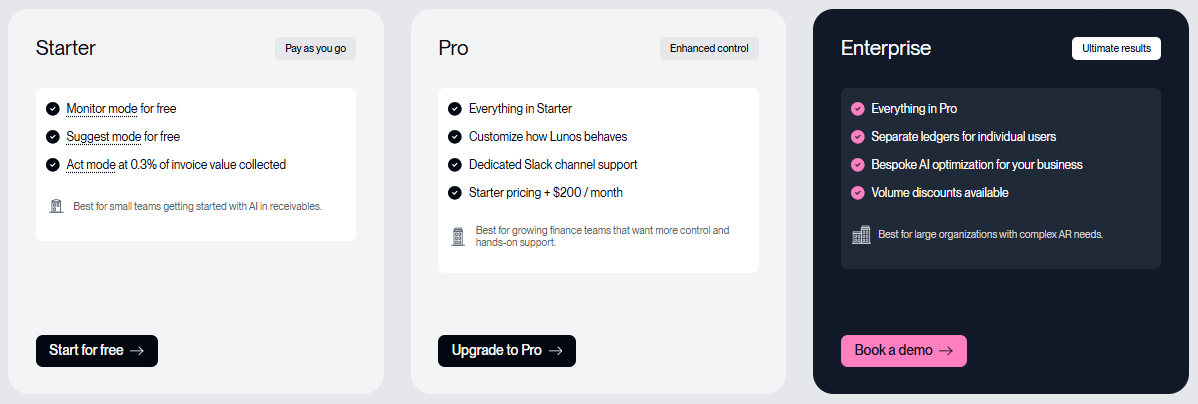
Lunos offers straightforward pricing that scales with your business:
Starter
Pay-as-you-go model with free access to customer modes, multiple payment channels, and essential features. The first $100k/month in collections is free when using Suggest mode, after which the fee is 0.3% of collected revenue.
Pro ($200/month)
Everything in Starter, plus customizable behavior settings, dedicated Slack support, and unlimited users. Great for growing teams seeking greater control.
Enterprise (Custom Pricing)
Built for larger businesses with complex AR needs. Includes everything in Pro plus individual ledgers, custom AI optimization, detailed performance reviews, NetSuite and Salesforce integrations, and white-glove onboarding.
Most teams find Lunos more affordable than enterprise platforms while delivering better workload reduction.
Which AR Platform Is Right for Your Business?
At this point, the differences should be clear. Here's a summary to help you decide:
Final Verdict: Billtrust vs. YayPay vs. Lunos
For most teams, Lunos is the clear winner. It's next-gen AR automation that handles the real work collectors do. It doesn’t just send reminders or manage systems.
It’s like having a tireless team member who reads emails, understands context, tracks payment promises, and adjusts follow-ups based on what customers actually say.
Teams typically go live within 2–4 weeks (not months) and achieve a 75% reduction in AR workload, while improving customer relationships and cash-forecasting accuracy.
Ready to see how an AI coworker can transform your accounts receivable process?
Start for free with Lunos and discover how finance teams are scaling invoice volume 5-10x without adding headcount.
Frequently Asked Questions
Which is easier to set up, Billtrust or YayPay?
YayPay is faster at 2–4 months, compared with Billtrust's 3–6 months, but both require significant integration work. Lunos is the quickest option. Most teams are up and running in 2–4 weeks without needing dedicated IT support.
How does pricing compare between Billtrust and YayPay?
Billtrust costs $20,000–$ 60,000 annually, while YayPay typically costs $15,000–$40,000+. Both use custom pricing based on invoice volume. Lunos offers transparent, usage-based pricing that works for companies of all sizes.
Can these platforms handle customer responses automatically?
No. Both Billtrust and YayPay send automated reminders, but they can't actually process customer replies. Your team still needs to follow up manually. Lunos is different: it reads responses, understands what customers mean, and automatically adapts follow-ups just like a human collector would.
Which platform has better cash forecasting?
While YayPay offers AI-powered forecasting, Lunos delivers more accurate predictions by tracking real-time customer promises and payment commitments. This is information that traditional AI models miss entirely.
Make your receivables effortless and focus on what you do best