

Summarize:


We Reviewed the Top 7 Invoiced Alternatives for Modern AR Teams
This guide breaks down the top 7 Invoiced alternatives: Lunos, Upflow, Chaser, Ordway, Maxio, VersaPay, and Gaviti. Each offers deeper automation, smarter collections, and better customer communication for teams that have outgrown Invoiced.


Quick Summary
This guide breaks down the top 7 Invoiced alternatives: Lunos, Upflow, Chaser, Ordway, Maxio, VersaPay, and Gaviti. Each offers deeper automation, smarter collections, and better customer communication for teams that have outgrown Invoiced.
Here are our top three picks:
Looking for the Right Invoiced Alternative for Your Team?
Invoiced works well for small to mid-sized teams with flexible billing, a clean customer portal, and simple automation. But as your AR team grows, its basic workflows, limited collections logic, and manual oversight can start to slow things down.
In this Lunos guide, we review 7 top Invoiced alternatives that deliver smarter automation and clearer customer communication.
Why Listen to Us?
At Lunos, we help finance teams across SaaS, B2B services, and mid-market companies simplify their AR operations and collect payments faster with less effort. Our experience with high-volume invoices and complex customer communication enables us to provide a practical, unbiased look at the best alternatives to Invoiced.
What is Invoiced?
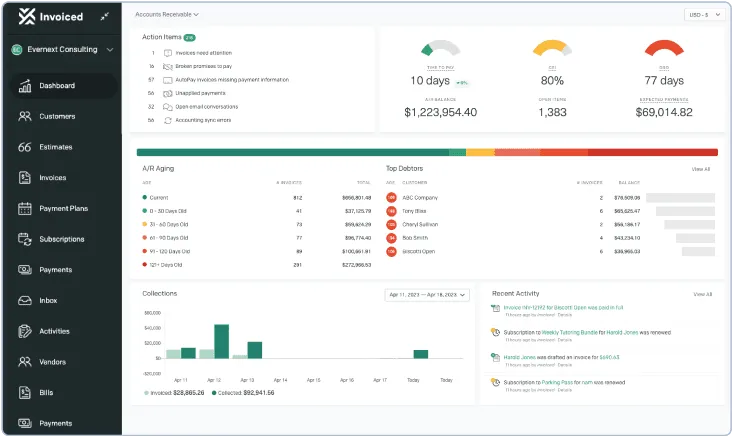
Invoiced is an accounts receivable platform built for small and mid-sized businesses. It automates invoicing, reminders, payment collection, and simple cash application. The platform is known for flexible billing, a customer portal, and support for subscriptions or usage-based billing.
Key Features
- Automated invoicing: Creates and sends invoices on schedule or via triggers.
- Payment reminders: Sends follow-up emails for upcoming or overdue invoices.
- Customer payment portal: Lets customers pay invoices, manage cards, and view payment history.
- Recurring and usage-based billing: Supports subscriptions, variable charges, and automated billing cycles.
- Payment processing: Accepts multiple payment methods, including cards and ACH.
Limitations of Invoiced
- Limited advanced automation: Not ideal for teams needing deeper collections or intent-based workflows.
- Fewer integrations: Connects with common tools but lacks broader enterprise connections.
- Basic dispute handling: Complex back-and-forth still requires manual tracking.
- Not built for high volume AR: Best suited for smaller teams with simpler billing needs.
- Manual oversight needed: Payment matching and reminders may still require occasional adjustments.
7 Top Invoiced Alternatives For Businesses
Here’s a quick comparison of the alternatives.
1. Lunos
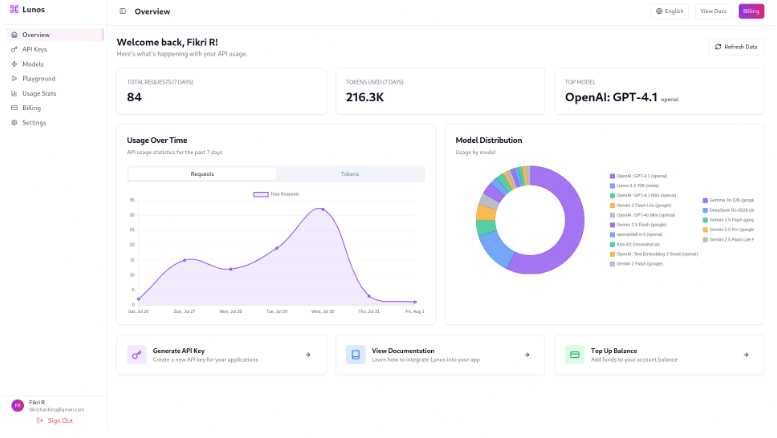
Lunos is a modern accounts receivable platform built for finance teams that want faster collections without extra manual work. Its two-way intelligence reads customer messages, adapts follow-ups, and handles payment questions in a natural, human-like way.
It integrates with tools like NetSuite, QuickBooks, Xero, and HubSpot to centralize AR data and track every interaction. With real-time insights, automated reminders, and accurate payment tracking, Lunos helps businesses improve cash flow and stay ahead of rising invoice volume.
Key Features
- AI-driven receivables agent: Operates around the clock, sending reminders, answering customer questions, matching payments, and handling routine follow-ups.
- Two-way communication intelligence: Interprets email context and payment patterns to craft natural, human-like follow-up messages.
- Automatic contact detection: Finds the correct payer or approver and updates contact details so messages reach the right person.
- Adaptive follow-up logic: Adjusts timing, tone, and escalation steps based on customer actions and invoice status.
- Centralized AR workspace: Integrates with QuickBooks, NetSuite, Xero, HubSpot, and major payment tools for a unified view of receivables.
- Multi-channel communication: Supports outreach and responses through email, Slack, and the customer portal.
- Live insight dashboards: Provides real-time updates on invoice progress, payment behavior, cash flow signals, and team activity.
Pricing
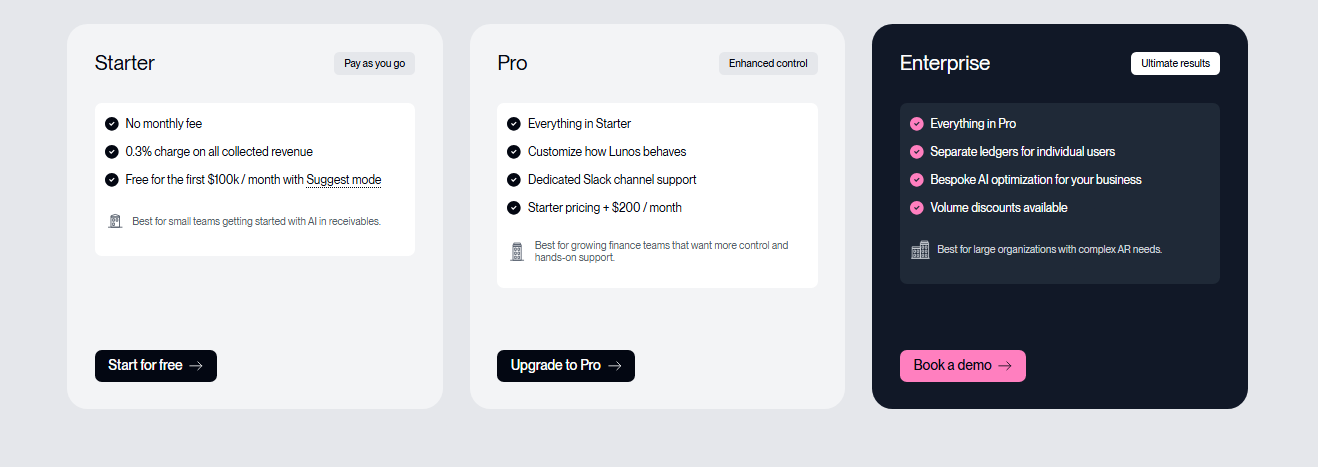
- Starter: No monthly fee. Suggest Mode is free for the first 100k collected each month, with a 0.3% fee on collected revenue.
- Pro: $200/month + 0.3% fee, Slack support, added configuration options.
- Enterprise: Custom pricing, multi-entity support, tailored AI behavior, volume discounts, and onboarding.
Pros
- Human-like automation for improved reply rates and payment clarity
- Adapts intelligently to every customer interaction, reducing errors and missed opportunities
- Centralized conversations keep AR work organized in one place
- Real-time intent signals help teams focus on the right invoices
Cons
- Enterprise pricing is only available on request
2. Upflow
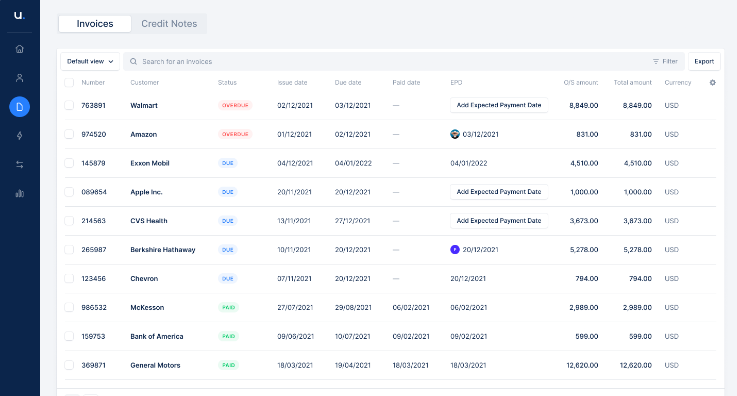
Upflow is an accounts receivable platform for small to mid-sized teams seeking clear visibility into cash flow. Its intuitive dashboard and customer portal streamline collections, reminders, and payments without adding extra manual work.
Key Features
- Invoice tracking and status dashboard: Shows all outstanding invoices and payment status at a glance.
- Automated payment reminders: Sends scheduled or triggered reminders for upcoming or overdue invoices.
- Customer portal: Lets clients pay invoices online, and manage their billing history.
- Cash flow forecasting: Projects expected payments based on invoice data and customer behavior.
- Aging reports and analytics: Highlights slow-paying accounts and optimizes collection priorities.
Pricing
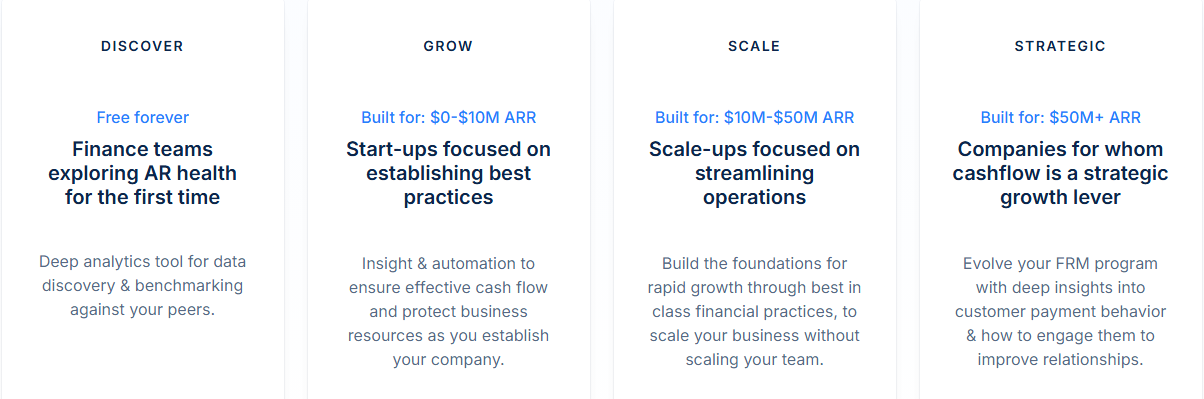
- Discover: Free plan with core AR features.
- Grow: Custom pricing. For companies up to roughly $10 million ARR. Adds automated workflows, advanced insights, and improved customer engagement.
- Scale: Custom pricing. For companies $10–50 million ARR. Supports higher invoice volume, expanded automation, and detailed reporting.
- Strategic: Custom pricing for companies above $50 million ARR. Includes full financial relationship management capabilities and advanced analytics.
Pros
- Reduces email back-and-forth because customers can resolve tasks on their own
- Strong aging insights help teams spot slow-paying accounts quickly
- Supports international operations, making cross-border invoicing easier
Cons
- Limited advanced collections automation compared with larger AR tools
- Customer portal adoption depends heavily on customer engagement
3. Chaser
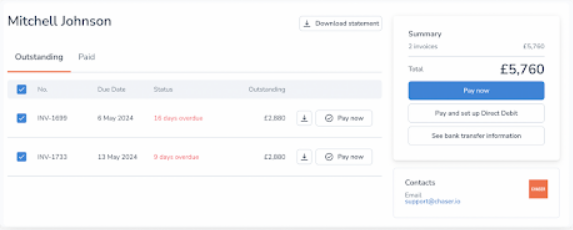
Chaser is an AR tool that automates invoice reminders and follow-ups. It’s ideal for small to mid-sized businesses that need consistent collections without manual effort. Known for its customizable reminder timing and a simple interface, Chaser helps teams keep invoices on track while maintaining clear communication with customers.
Key Features
- Automated invoice reminders: Sends scheduled reminders for upcoming or overdue invoices.
- Payment status tracking: Monitors invoice status and flags overdue or unpaid invoices.
- Customer follow-up sequences: Creates customizable sequences of reminders and follow-ups.
- Communication logging: Records emails and responses to track customer interactions.
- Reporting and analytics: Provides insight into overdue invoices, payment cycles, and customer trends.
Pricing
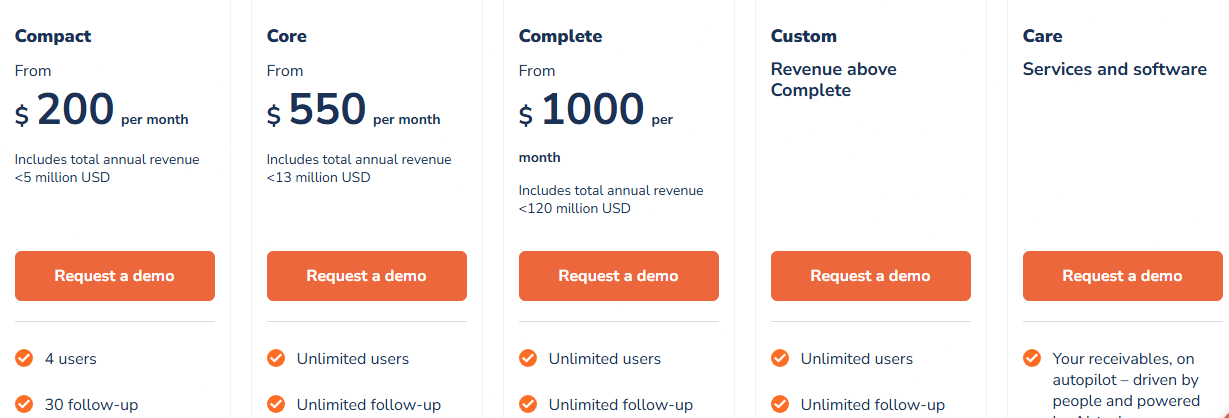
- Compact: $200/month. Includes up to $5M annual revenue, 4 users, 30 templates, and 4 automated workflows.
- Core: $550/month. Covers companies up to $13M revenue; unlimited users, unlimited workflows, multi-entity support.
- Complete: $1000/month. For larger organisations ( up to $120M), includes dedicated account manager, priority support, and unlimited automations.
- Custom/Care: Pricing is on request. Includes full flexibility, custom integrations, and support.
Pros
- Email logging and tracking gives a clear history of customer contact and response times
- Supports multi-user access so several team members can manage follow-ups together
- Ensures targeted follow-ups improve payment rates
Cons
- Focuses mainly on reminders; lacks robust cash application or payment matching tools
- Limited support for complex billing scenarios or subscription-based invoicing
4. Ordway
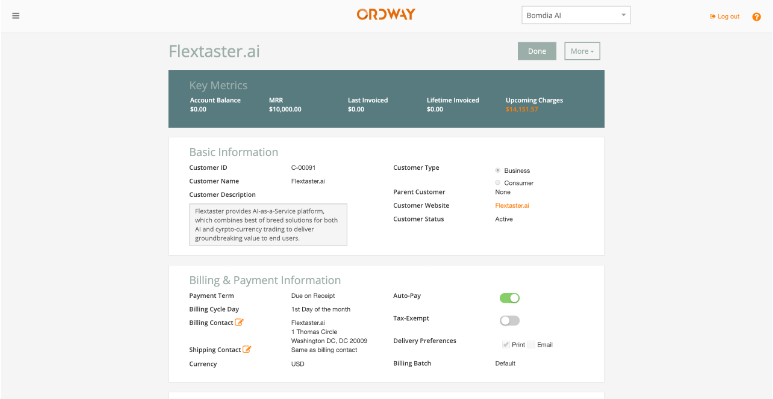
Ordway is a billing and revenue automation platform built for companies with complex pricing, subscriptions, or usage-based models. It handles invoicing, rating, revenue recognition, and collections in one system. Ideal for SaaS and B2B businesses, Ordway stands out for its flexible, rules-driven billing engine that adapts to unique business needs.
Key Features
- Flexible subscription billing: Handles subscriptions, usage-based charges, and variable billing cycles.
- Automated invoicing: Generates invoices based on subscription terms, usage data, or custom billing events.
- Revenue recognition support: Automates GAAP/IFRS-compliant revenue recognition for billed services.
- Customer account management: Lets customers update payment details, view billing history, and manage subscriptions.
- Automated payment and collections processing: Matches payments and triggers follow-ups for late or failed payments.
Pricing
Custom pricing based on billing complexity, invoice volume, and the selected modules.
Pros
- Flexible billing logic adapts to one-time, recurring, or usage-based invoices
- Self-service portal improves customer experience and reduces support requests
- Detailed reporting on revenue, churn, and billing performance helps track financial health
Cons
- Higher complexity may require more setup and onboarding effort
- Limited out-of-the-box templates may need custom configuration for unusual billing models
5. Maxio
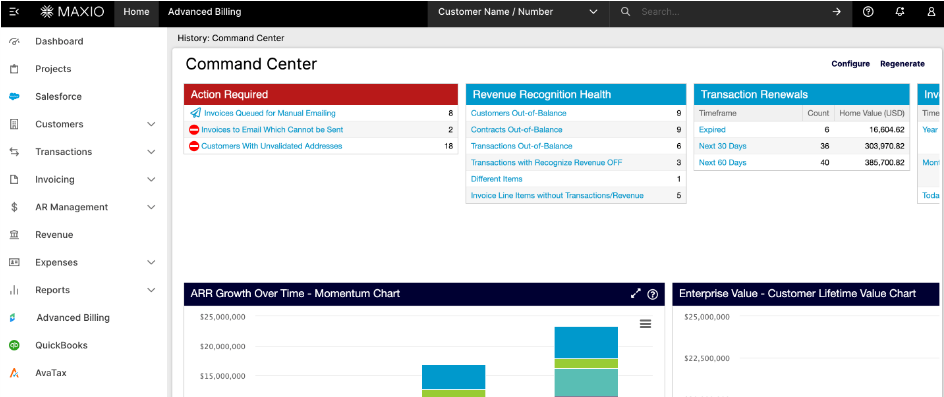
Maxio is a subscription management and billing platform designed for growing SaaS and recurring-revenue businesses. The tool handles billing cycles, usage tracking, invoice generation, and revenue recognition. It’s ideal for companies needing scalable subscription infrastructure. What sets Maxio apart is its flexible billing logic and built-in revenue insights tools.
Key Features
- Automated revenue recognition: Reduces manual tracking and ensures GAAP/IFRS compliance.
- Unified revenue operations: Combines billing, collections, subscription management, and financial operations in one platform.
- SaaS metrics and financial analytics: Tracks MRR, ARR, churn, cash flow, and other key metrics for better financial visibility.
- Payment gateway support: Supports 20+ gateways and multiple currencies for global billing.
- Customer portal and self-service billing: Lets clients manage subscriptions, update payment methods, and view invoices.
Pricing
- Grow: $599/month. Covers up to $100,000 in monthly billings; includes core subscription billing, revenue recognition, reporting, and standard payment gateway support.
- Scale: Custom pricing based on monthly billings. Includes advanced revenue recognition, A/R management, and enterprise-level features.
Pros
- Reduces manual revenue tracking and streamlines billing operations
- Minimizes billing errors and customer disputes through flexible usage handling
- Provides actionable insights on subscription performance, helping teams make smarter growth decisions
Cons
- Setup can be complex and may require onboarding support
- Not ideal for simple one-time billing needs due to heavy subscription-billing focus
6. VersaPay
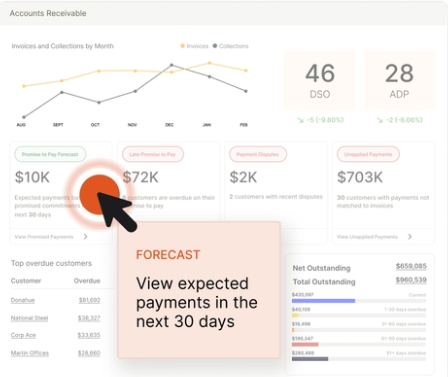
VersaPay is an accounts receivable platform designed for mid-sized to large B2B teams. It streamlines invoicing, collections, and payment processing while giving customers a self-service portal to view invoices, pay online, and resolve issues independently. This reduces manual work for AR teams and improves cash flow visibility.
Key Features
- Digital invoicing: Send branded electronic invoices directly to customers.
- Customer self-service portal: Lets clients pay, view invoice history, and manage disputes independently.
- Automatic cash application: Matches incoming payments to invoices without manual intervention.
- Support for multiple payment methods: Accepts credit cards, ACH, and virtual cards for flexible payment options.
- Invoice collaboration tools: Enables customers and AR teams to comment, dispute, or clarify charges within the invoice thread.
Pricing
Custom pricing based on account size, feature needs, and transaction volume.
Pros
- Reduces manual reconciliation with automatic cash application
- Support for multiple payment methods gives flexibility and convenience
- Simplifies resolution of invoice disputes, reducing follow-up delays
Cons
- Customer portal reliance can delay payments when clients don’t check it
- Limited flexibility for custom invoice formats may affect complex billing
7. Gaviti
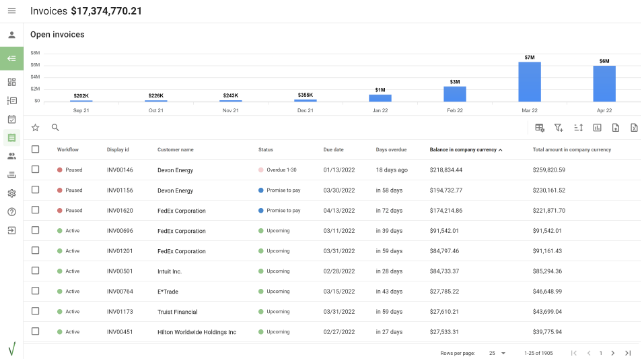
Gaviti is a collections management platform focused on helping AR teams keep invoices moving. It automates follow-ups, tracks collector tasks, and highlights accounts that need attention. Built for mid-sized companies that want structured, predictable collections, Gaviti’s strength is its performance-driven collections workflows.
Key Features
- Automated collection workflows: Builds customized follow-up sequences for overdue invoices.
- Collector task management: Creates daily task lists to guide collectors on which accounts need attention.
- Payment prediction insights: Uses account behavior and history to estimate payment likelihood.
- Dispute and issue tracking: Logs disputes, missing POs, and payment blockers in one place.
- Customer communication hub: Stores emails, replies, and outreach history for each account.
Pricing
Custom pricing based on company size, collections volume, and automation needs.
Pros
- Collector task lists prioritize follow-ups and reduce missed invoices
- Maintains consistent outreach without manual tracking, improving collections efficiency
- Centralizes dispute resolution, helping unblock stuck invoices faster
Cons
- Relies on accurate customer data for payment predictions to work well
- Limited payment processing features; needs an external gateway for payments
Improve Cash Flow and Collections With Lunos
Each tool offers alternatives to Invoiced, from reminders to full-scale billing operations. But if you’re looking for deeper automation, clearer customer intent, and a platform that adapts intelligently to every interaction, Lunos stands out.
Our two-way intelligence, human-like automation, and real-time insight into customer intent keep invoices moving even when your team is offline. You get smarter follow-ups, cleaner workflows, and a centralized view of every conversation, all in one platform.
Ready to accelerate cash flow? Get started with Lunos for free.
Make your receivables effortless and focus on what you do best