The Cash Application Process: How It Works
Quick Summary
- Cash application matches incoming payments to the right open invoices and posts them to your ledger. It's the final step of AR
- Getting paid isn't the finish line. AR ends when the money is properly accounted for, not when it arrives
- Three pieces have to line up for a match: the invoice, the payment, and the remittance that says which invoices the payment covers
- Until a payment is applied, your AR records are wrong. Credit stays tied up, aging overstates what is outstanding, and every metric built on the data drifts
- Exceptions are where the hours go. Partial payments, short pays, deductions, and missing remittance all need research before anything can be posted
- Unapplied cash creates false past-dues, which means chasing customers who already paid
- Rule-based automation speeds up the simple cases. Agentic AI works the exceptions that used to need a person
What is cash application?
The cash application process is how you match a customer's payment to the invoices it pays. It's the final step of accounts receivable, and the one that gets treated as a formality. The cash is home. Until someone counts it in, the books say it never arrived.

Three pieces have to come together for a match:
- The invoice, which says what is owed
- The payment, which says how much arrived
- The remittance, which says which invoices the payment is meant to cover
When all three line up, cash application is quick. When the remittance is missing, or the amount doesn't match, the work begins.
It matters for a simple reason. Until a payment is applied, your AR records are wrong. Credit stays tied up on accounts that have already paid, your aging report overstates what is outstanding, and every metric built on that data drifts. Clean cash application keeps the whole picture honest.
The 4 steps of the cash application process
The process runs the same way whether you do it by hand or with software. Four stages take a payment from your bank account to a cleared invoice.
1. Receiving the payment
A payment lands. It might arrive by ACH, wire, card, or check, and each channel carries its remittance differently. A check might include a stub. An ACH payment might reference an invoice number, or nothing at all.
Your first job is to capture both the payment and whatever remittance came with it. A clean payment with clear remittance sets up an easy match. A lump sum with no breakdown sets up a puzzle.
2. Matching payment to invoice
Next, you match the payment to the open invoices it covers. One payment for one invoice at the exact amount is the simple case, and it clears in seconds.
Most real payments are messier. A customer pays twelve invoices in a single transfer, or pays a rounded amount, or references an old invoice number. Matching means reading the remittance, finding the right open invoices, and confirming the numbers add up before anything gets posted.
3. Handling exceptions
When a payment doesn't match cleanly, it becomes an exception. This is where the hours go.
Exceptions include partial payments, short pays, deductions, and payments with no remittance at all. Each one needs research. Pull the account, check for a dispute, look for a credit memo, and decide how to code the difference. Exceptions can't just be posted. They have to be understood first.
4. Posting and reconciliation
Once a payment is matched, you post it to your ERP or general ledger. That clears the invoice, frees the customer's credit, and updates your AR balance.
Then you reconcile, checking that the cash hitting your bank matches the cash posted to your books. Anything you couldn't apply sits in an unapplied or suspense account until someone resolves it. The smaller that pile, the healthier your process.
Why cash application breaks at scale
At low volume, one person can match payments in an afternoon. As volume grows, the same work turns into a bottleneck, and the causes are always the same handful of problems.
- Multi-invoice payments. One payment covers many invoices. If the remittance lists them, you split it across each. If not, you're guessing which invoices it covers, and guessing wrong creates downstream errors
- Partial payments and short pays. The customer pays less than invoiced, and you have to work out why. It could be a dispute, an approved discount, a deduction, or an error. The amount is only half the story. The reason decides what happens next, and finding it takes digging
- Deductions and chargebacks. Some short pays are deductions. A claimed discount, a damaged shipment, a promotional allowance, or a chargeback each needs coding to the right reason and routing to whoever can approve or dispute it. A reminder only annoys the customer
- Missing or mismatched remittance. The hardest case. Payment arrives with no remittance, or one that matches no open invoice. Money with no brand on it, and someone has to work out where it belongs. Until then, the cash sits unapplied and the customer looks past due
The false past-due problem
Here is the quiet damage. When cash piles up unapplied, your records still show those invoices as open. This means your reminders go out to customers who have already paid.
Nothing burns trust faster. The customer paid on time, then got chased for it, and now questions whether you have your act together. It's a pure own-goal that the customer did nothing to cause, and it makes your whole AR function look careless.
A slow cash application process delays your books and actively works against your collections effort, sending your team after the wrong accounts.
Manual vs automated cash application
Cash application is a natural target for automation, and not all automation is equal. It helps to be honest about what different approaches actually change.
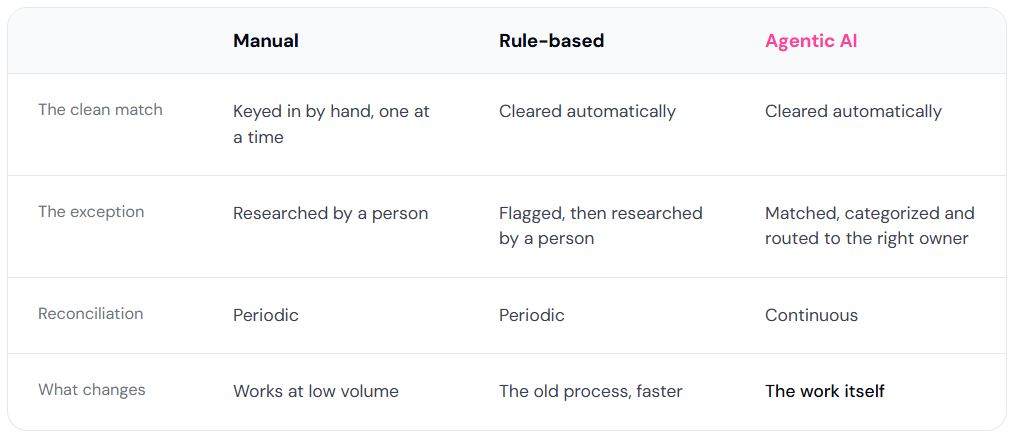
Manual cash application
Your people open remittance by hand, key in the details or chase missing information, match payments in a spreadsheet or ERP, and clean up exceptions one at a time.
It works at low volume. It gets slow and error-prone as payments grow, and it's exactly the low-value admin that burns out good finance people.
Rule-based automation
Rule-based tools aim to speed up the simple cases. The software reads remittance faster than a person, clears the straightforward payments automatically, and flags exceptions for review.
This is real and useful. It also mostly makes the old process faster rather than changing it. Rigid rules still break on the messy payments, and every exception falls back to a human queue, which eats the same hours it always did.
If you're weighing tools, the guide to cash application software compares the main options.
Agentic AI
The agentic approach aims to change the work itself rather than accelerate it. Instead of matching on fixed rules, an agent automates remittance capture, matches payments across the messy cases, flags and categorizes exceptions and routes them to the right owner, and keeps reconciliation continuous rather than periodic.
In other words, it works the cases that used to need a person. More on the agentic approach in the guide to improving cash application with AI.
See how Lunos solves this
Chasing a customer who already paid is the most expensive email in AR. Lunos cash application matches payments to invoices, works the exceptions rule-based tools can't, and holds any dunning on accounts carrying unapplied cash.
FAQs
What is the cash application process in accounts receivable?
It's the step where you match a customer's payment to the invoices it covers and post it to your ledger. It's the final stage of AR, and it's what turns received cash into an accurate, up-to-date picture of what you're still owed.
What is the difference between cash application and cash posting?
Cash application is the matching decision, working out which invoices a payment pays. Cash posting is the bookkeeping, recording that payment against those invoices in your ledger.
What causes unapplied cash?
Payments that can't be matched cleanly. Missing remittance, multi-invoice lump sums, short pays, deductions, and mismatched references all leave cash sitting in a holding account until someone resolves it.
How fast should cash be applied?
Same day is the standard worth holding. Every day a payment sits unapplied is a day your aging report overstates what is outstanding, and a day closer to a reminder going out to a customer who already paid.
The simple matches were never the problem
Lunos works the partial payments, short pays, and missing-remittance cases that eat your team's hours, and posts the clean matches on its own. Book a demo to see it clear an unapplied cash queue.