

Summarize:


11 best Paystand alternatives for B2B accounts receivable teams
Paystand handles B2B payments well, but most AR teams need more than a payment rail. These are the strongest alternatives for collections, automation, and cash flow.

Janine Sullivan
19 October 2026

Quick summary
Paystand handles B2B payments well, but most AR teams need more than a payment rail. These are the strongest alternatives for collections, automation, and cash flow.
Looking for the best Paystand alternatives?
Your AR team is chasing replies by hand, reconciling payments in spreadsheets, and losing track of who promised to pay when. Paystand has processed over $20 billion in B2B payments, but a payment rail and an AR workflow aren't the same job.
Paystand was built around the payment side. The 11 tools below are AR platforms, compared on collections depth, reply handling, pricing, and ERP integrations so you can find the right fit.
Why listen to us?
Ramya Varma, CFO at Workweek, brought her team's DSO from 46-47 days down to about 36 after switching to Lunos. Ricky Atkins, Director of Accounting at Revela, collected aged AR that'd been sitting for months and reduced some customers' outstanding balance to zero.
Johan Strid at Swap said Lunos took collections "from a constant manual effort to something that just runs in the background." All three results came from replacing manual follow-ups with AI-powered collections, and that's the gap most Paystand users hit.
What is Paystand?
Paystand is a payment provider with AR functionality bundled around its payment network. Payments routed over that network carry no transaction fee, though card and ACH payments still carry standard processing costs. It integrates with ERPs like NetSuite, Sage Intacct, and Microsoft Dynamics 365. Beyond the payment rail, it also offers a payment portal, Smart Match for AI-powered reconciliation, and a Collections Agent for automated follow-ups.
The rational case for Paystand is that you want to solve payments across a range of rails, cards included, and bundle AR, AP and spend management around that. It's strongest as a payment rail, moving money between bank accounts without per-transaction costs.
Why look for Paystand alternatives?
AR workflows that stop at the payment rail
Paystand does some of this. It structures outreach and runs dunning through its Collections Agent, so the sending side is covered. What it doesn't do is work a case to a resolution. When a customer replies "we'll pay next Friday," nothing reads that email, logs the promise and schedules the follow-up for the following Monday. Your team still does that by hand. If your biggest problem is collections workflow, not payment processing, Paystand leaves a gap.
Implementation and support that slow teams down
Paystand's model is predicated on you running your payments through them, and payments are hard to migrate. Moving your customers onto a new payment method is a bigger project than bolting an AR tool onto your ledger, which is why implementation runs longer than teams expect. Getting help along the way isn't always easy either.
"After working to implement Paystand for almost a year (due to the lack of response and follow-up on the Paystand side), we continue to have issues with Paystand not having deposits created at times, especially at month end when we need to close our books."
Another user added:
"Getting support is challenging as well. I have an 'Account Manager' and she is not very responsive or helpful. When working with the rest of the support team, we have to wait for DAYS for answers."
No AP portal submissions, and cash application that stops at the rail
Two gaps matter more than the rail itself. Paystand doesn't submit your invoices into your customers' AP portals, so if a chunk of your book buys through Ariba or Coupa, somebody on your team is still keying invoices in by hand. And its cash application validates the transaction on the payment rail, which covers the clean cases. A payment that arrives short, or one covering six invoices with no remittance advice, is where the work sits.
Network adoption is the smaller point. The zero-fee model runs on Paystand's own network, and some recipients' banks flag those transactions as unfamiliar. For most transactions it won't be the thing that decides anything.
11 best Paystand alternatives
Leaving Paystand usually means one of two things. If you want a different payment rail, that's a payments decision, and Stripe, GoCardless, Melio and Balance are where to look. If the chasing and the replies still land on your team, that's a receivables problem and a new rail won't fix it. The eleven tools below answer that second one.
| Tool | Best for | Starting price | Rating |
|---|---|---|---|
| Lunos | AR teams that need AI-powered collections and reply handling | 0.3% on collections | G2: 4.8/5 (3 reviews) |
| Tesorio | Finance teams focused on cash flow forecasting and predictive AR | Custom | G2: 4.7/5 |
| HighRadius | Enterprise organizations on SAP or Oracle | Custom | G2: 4.3/5 |
| Versapay | Mid-market teams wanting a collaborative AR portal | Custom | G2: 4.1/5 |
| Upflow | SaaS companies tracking AR health in real time | Free (Discover) | G2: 4.8/5 |
| Chaser | Small businesses on Xero or QuickBooks | $259/mo | G2: 4.4/5 |
| BILL | SMBs needing AP and AR in one place | $49/user/mo | G2: 4.4/5 |
| Billtrust | Enterprise AR teams with high invoice volumes | Custom | G2: 4.4/5 |
| Kolleno | Mid-market teams needing AI-assisted collections | $650/user/mo | G2: 4.9/5 |
| Invoiced | B2B finance teams automating invoice-to-cash | Custom | G2: 4.5/5 |
| Tabs | SaaS companies automating contract-to-cash | $2,000/mo | G2: 4.8/5 |
1. Lunos

Lunos is an AI coworker for accounts receivable that reads, understands, and answers customer payment communications.
We read every reply your customers send, understand what they're saying, and act on it. If a customer writes "we'll pay next Thursday," we log that promise and adjust the follow-up schedule. When Thursday passes without payment, we check back automatically. If someone disputes an invoice, we flag it for your team with the full context attached.
Ramya Varma, CFO at Workweek, brought her team's DSO from 46-47 days down to about 36 after we took over collections. That kind of result comes from two-way communication and promise tracking.
You control how much autonomy we get through three modes. Monitor shows you what we'd do without acting. Suggest drafts the follow-up and waits for your approval. Act runs the entire workflow end to end. You can set different modes for different customers, so your largest accounts get human oversight while routine invoices run on autopilot.
Daily summaries, approval requests, and exception alerts all come through Slack, so you don't need to learn a new dashboard.
Why choose over Paystand
Paystand processes the payment once your customer is ready to pay. The problem is how rarely that's the blocker.
Fixing the rail doesn't fix the receivable. Payment is the last step, and most late invoices stall well before it.
- The PO number is missing or wrong, so AP won't process the invoice
- The invoice never made it into the customer's AP portal
- A line item is disputed and nobody has picked it up
- Approval is sitting with a manager who's out of office
- The remit-to details changed and nobody told the customer
- The payment arrived with no remittance advice, so it can't be applied
None of those are payment problems. A faster, cheaper rail doesn't touch a single one. We handle the follow-ups, the reply handling and the promise tracking that move invoices from outstanding to collected, and you can pair us with any payment processor.
Key features
- Collections Agent: Run end-to-end follow-up sequences that read customer replies, log promises to pay, and adjust timing automatically.
- Two-way AI communication: Understand customer intent from email replies and take action without human intervention.
- Monitor/Suggest/Act modes: Set the level of autonomy per customer, from full oversight to fully autonomous collections.
- Dispute management: Flag disputed invoices with full context so your team resolves them faster.
- Slack-native workflows: Get daily AR summaries, approval requests, and alerts in Slack.
- ERP integrations: Sync with NetSuite, QuickBooks, Xero, Sage, Salesforce, HubSpot, and Stripe.
- Cash application and reconciliation: Match incoming payments to open invoices automatically.
Pricing
- Pay as You Go: 0.3% on collections, charged only on the accounts you put Lunos in charge of, up to $5M, max 3 users
- Growth: $15,000/year, $5M-$10M in collections, unlimited users
- Enterprise: Custom pricing, $10M-$1B+
Pros
- Reads and responds to customer emails, not just one-way reminders.
- Three autonomy modes let you control exactly how much the AI handles per customer.
- SOC 2 Type II attested, with customer data encrypted and never shared across accounts.
Cons
- Newer than most tools on this list, with a shorter customer list.
- NetSuite and Salesforce integrations require the Growth or Enterprise tier.
- AI phone calls and text messages aren't live yet.
2. Tesorio
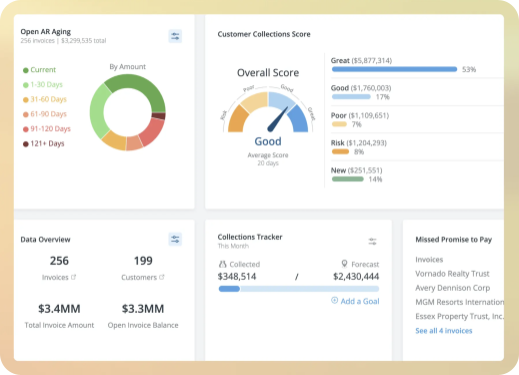
Tesorio's a cash flow performance platform that combines AR automation with predictive analytics. It forecasts when you'll get paid based on historical patterns and customer behavior. Then it automates dunning workflows to close the gap between predicted and actual payment dates.
Finance teams use it to predict cash positions weeks out, and that's more precise than working from aging reports alone.
Why choose over Paystand
Tesorio adds the analytical layer that Paystand doesn't offer. You'll get cash flow forecasts, predictive payment scoring, and dunning automation in one platform.
Key features
- Cash flow forecasting: Predict when invoices will be paid based on customer payment history and behavioral patterns.
- Predictive analytics: Score each invoice by likelihood and timing of payment to prioritize collection efforts.
- Automated dunning: Set up multi-step follow-up sequences triggered by invoice age and customer risk profile.
- ERP integrations: Connect with NetSuite, Sage Intacct, QuickBooks, and other major accounting platforms.
Pricing
Tesorio doesn't publish pricing on its site. Plans are quoted per account based on AR volume and modules selected.
Rating
G2: 4.7/5
Pros
- Cash flow forecasting gives finance teams visibility that few AR tools match.
- Predictive scoring helps collectors focus on the invoices most likely to slip.
- Flexible integration with major ERPs.
Cons
- No public pricing, so it's hard to evaluate without a sales call.
- It's geared toward mid-market and enterprise, so smaller teams probably won't find a fit.
- Getting fully set up can take time if your processes aren't aligned with the platform.
3. HighRadius
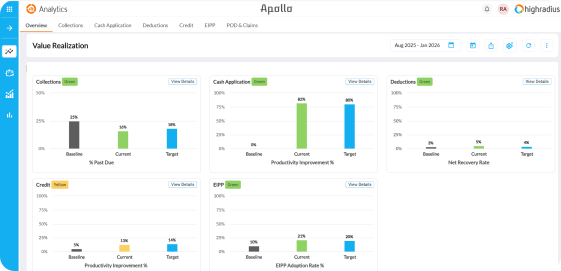
HighRadius is an enterprise-grade order-to-cash platform that covers the full AR lifecycle. It uses AI to match payments, automate collections, and manage credit risk across large invoice volumes. It integrates deeply with SAP and Oracle, so it's a natural fit for organizations already running those ERPs.
If you're processing tens of thousands of invoices across multiple regions, you'll get analytics and automation that smaller tools can't deliver.
Why choose over Paystand
HighRadius covers the full order-to-cash cycle, from credit decisioning through cash application. Paystand handles the payment step only. If you need AI-powered matching, credit management, and collections automation at enterprise scale, HighRadius fills a much wider gap.
Key features
- AI-powered cash application: Match incoming payments to open invoices automatically using machine learning.
- Collections management: Prioritize and automate outreach based on customer risk and payment patterns.
- Credit management: Automate credit scoring, limit setting, and review workflows.
- SAP and Oracle integration: Deep, pre-built integrations with enterprise ERP systems.
Pricing
HighRadius doesn't publish pricing. Plans are quoted based on transaction volume and modules.
Rating
G2: 4.3/5 (238 reviews)
Pros
- Covers the full order-to-cash cycle in one platform.
- AI-powered payment matching handles high volumes accurately.
- Pre-built SAP and Oracle integrations reduce setup time for enterprise teams.
Cons
- Implementation isn't simple and typically requires dedicated onboarding support.
- There's a lot of modules and dashboards, so the interface can feel overwhelming.
- It's priced for enterprise organizations, so it's likely out of reach for mid-market teams.
4. Versapay
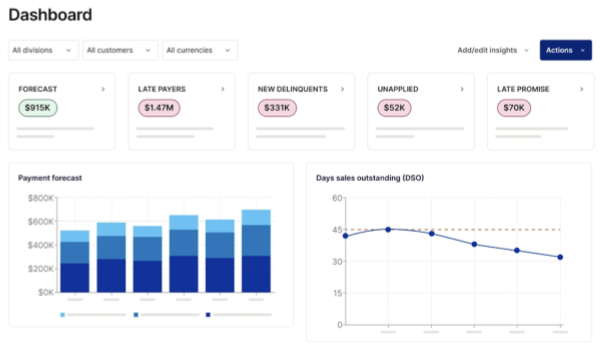
Versapay's a collaborative AR platform that gives your customers a self-service portal to view invoices, make payments, and raise disputes without email threads.
That self-service layer cuts the back-and-forth between AR teams and customers. When a buyer can check their own balance and pay on their own time, your team won't field as many inbound questions.
Why choose over Paystand
Versapay focuses on the customer-facing side of AR. Your buyers get a portal to view invoices, raise disputes, and pay on their own. Paystand sends and receives payments but doesn't give customers that self-service layer.
Key features
- Customer payment portal: Give buyers a self-service view of invoices, payment history, and account status.
- Collaborative AR: Let customers and AR staff communicate directly inside the platform.
- Automated collections: Set up dunning workflows based on invoice age and customer segment.
- ERP integration: Connect with NetSuite, Sage Intacct, Microsoft Dynamics, and other ERPs.
Pricing
Versapay doesn't publish pricing. Quotes are custom based on user count, transaction volume, and modules.
Rating
G2: 4.1/5 (101 reviews)
Pros
- Self-service portal reduces email-based back-and-forth with customers.
- Your team and your customer see the same invoice status, which cuts the back-and-forth.
- Strong ERP integration depth for mid-market deployments.
Cons
- No public pricing, so it's harder to compare.
- Portal adoption depends on your customers using it, and they won't always.
- It's better suited for mid-market and enterprise than small teams.
5. Upflow
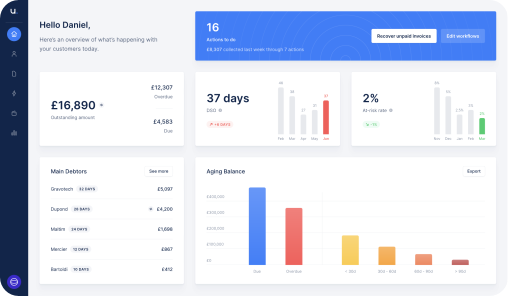
Upflow is a B2B collections and AR analytics platform for growing SaaS and services companies. It automates payment reminders, tracks every invoice in real time, and scores customer payment behavior to help collectors prioritize. Upflow's also recently added AI-powered "Promise to Pay" detection that reads customer emails and tags promises automatically.
Why choose over Paystand
Upflow gives you real-time AR analytics and automated dunning alongside payment collection. Paystand processes payments but doesn't track AR health, score customer risk, or automate the follow-up sequences that get invoices paid.
Key features
- Real-time AR analytics: Track DSO, collection effectiveness, and aging across your portfolio.
- Automated dunning: Build multi-step reminder workflows by customer segment and invoice age.
- AI Promise to Pay: Detect and tag payment promises from customer emails automatically.
- Payment processing: Accept credit card and ACH payments directly through the platform.
Pricing
Upflow offers a free Discover tier for AR analytics. Paid plans (Grow, Scale, Strategic) are quoted by ARR stage and aren't publicly priced.
Rating
G2: 4.8/5 (230+ reviews)
Pros
- Free tier lets teams evaluate AR health before committing.
- Real-time dashboards give clear visibility into cash flow.
- AI promise detection goes a step beyond basic reminders.
Cons
- Paid plan pricing isn't public, so you'll need a sales call.
- It's optimized for SaaS companies, and it won't fit every B2B model.
- You won't get the advanced features unless you're on a higher tier.
6. Chaser
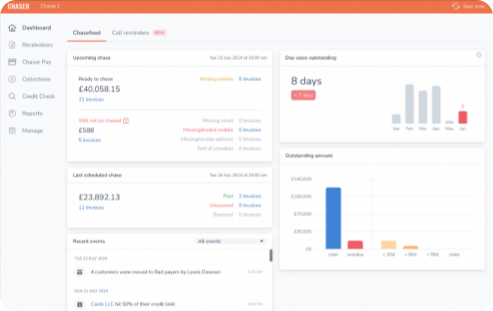
Chaser is a credit management and accounts receivable platform that automates payment reminders through email, SMS, and letters. It integrates tightly with Xero and QuickBooks, so it's a natural fit for small to mid-sized businesses already on those accounting platforms. Chaser also offers payment portals and credit checking.
Why choose over Paystand
Chaser plugs directly into Xero or QuickBooks and automates follow-ups from day one. If you're a smaller team that needs reminders and credit management without the complexity of a blockchain payment network, Chaser gets running faster.
Key features
- Automated payment reminders: Schedule multi-channel follow-ups by email, SMS, and letter.
- Credit checking: Run credit reports on new and existing customers inside the platform.
- Payment portal: Give customers a branded portal to view and pay invoices.
- Xero and QuickBooks integration: Two-way sync keeps invoice status current in your accounting tool.
Pricing
- Compact: $259/mo (4 users, 30 templates, 4 workflows)
- Core: $779/mo (unlimited users and workflows)
- Complete: $1,169/mo (dedicated account manager, priority support)
- Custom: For businesses over $100M annual revenue
Rating
G2: 4.4/5
Pros
- Deep Xero and QuickBooks integration makes setup straightforward.
- SMS chasing adds a follow-up channel most AR tools don't offer.
- Published pricing with clear tier distinctions.
Cons
- It's not a great fit for enterprise teams on NetSuite or SAP.
- The Compact tier limits you to 4 users and 4 workflows.
- AI capabilities aren't as deep as newer AR platforms.
7. BILL
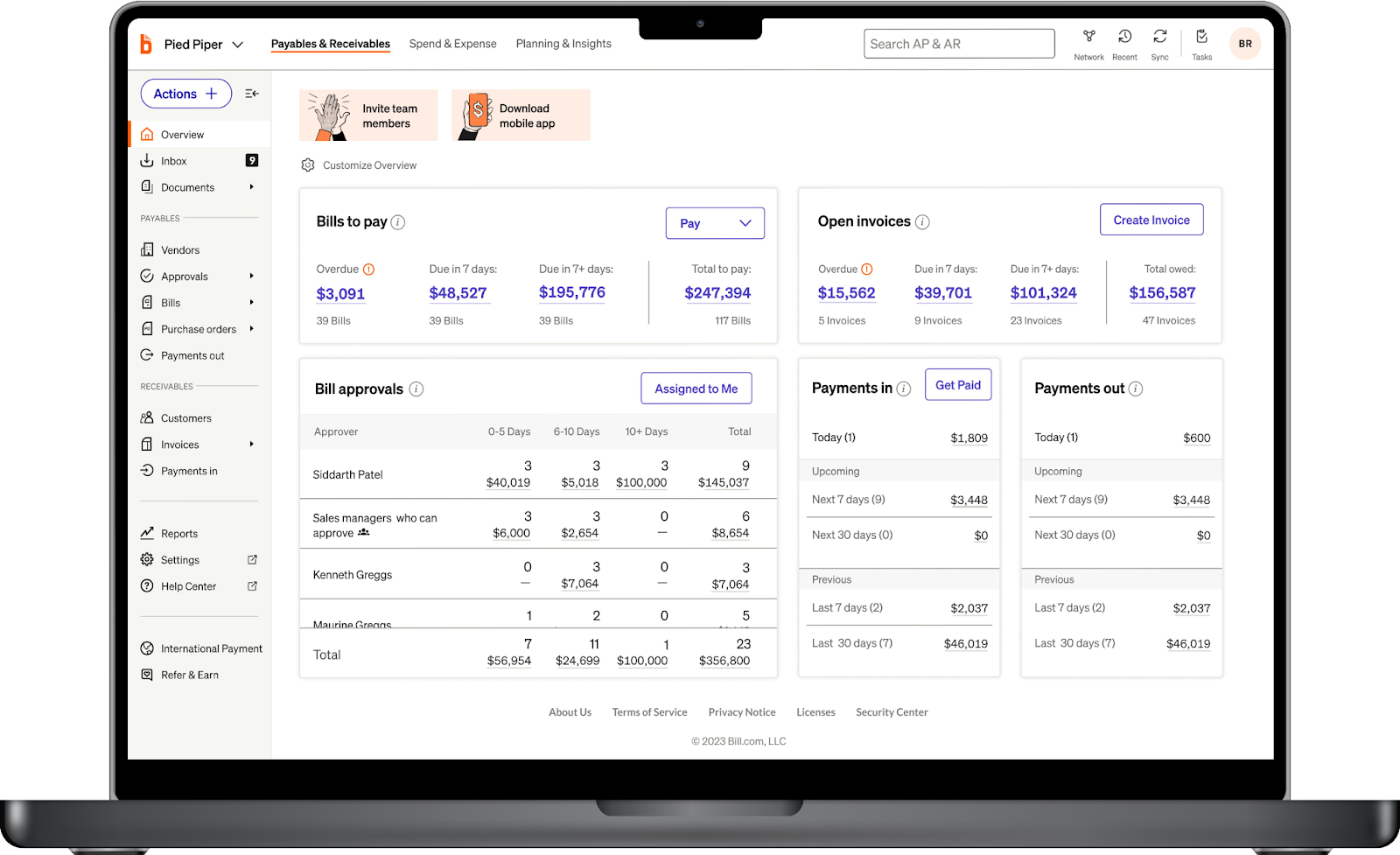
BILL (formerly Bill.com) is a financial operations platform covering both accounts payable and accounts receivable. The AR side handles invoicing, payment acceptance, and basic collections workflows. If you don't want to buy two separate platforms for AP and AR, BILL keeps everything in one place.
Why choose over Paystand
BILL covers AP and AR in one platform. Paystand focuses only on the payment side. If you need to manage outgoing payments, approvals, and incoming collections in a single tool, BILL consolidates that workflow.
Key features
- Invoicing and payment acceptance: Create, send, and track invoices with built-in ACH and card payments.
- AP automation: Manage bills, approvals, and vendor payments alongside AR.
- Basic collections: Set up payment reminders and track outstanding invoices.
- Accounting sync: Integrate with QuickBooks, Xero, NetSuite, and Sage Intacct.
Pricing
- Essentials: $49/user/mo
- Team: $65/user/mo
- Corporate: $89/user/mo
- Enterprise: Custom pricing
Rating
G2: 4.4/5 (4,019 reviews)
Pros
- AP and AR in one platform reduces tool sprawl for finance teams.
- Published per-user pricing makes budgeting straightforward.
- Largest G2 review base on this list at 4,019 reviews.
Cons
- AR features aren't as deep as dedicated AR automation tools.
- Collections automation isn't as strong as purpose-built alternatives.
- It started as an AP tool, so AR doesn't always feel like the main focus.
8. Billtrust
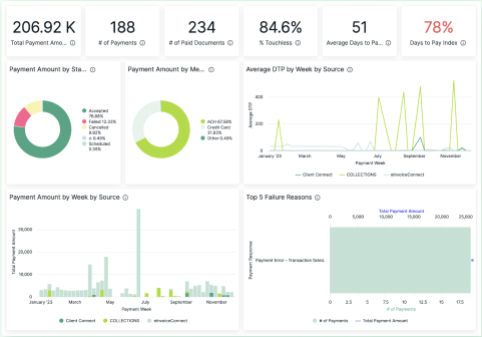
Billtrust is an enterprise AR platform covering the full lifecycle from invoice presentment through payment application. It uses AI to match payments, automate cash application, and manage collections at scale. Billtrust's held G2's AR Automation Leader status for 21 consecutive quarters.
Why choose over Paystand
Billtrust handles the complete AR lifecycle from invoice delivery through cash application. Paystand handles the payment step. If you process high invoice volumes and need AI-driven matching with deep analytics, Billtrust covers ground Paystand doesn't.
Key features
- AI-powered cash application: Match payments to invoices automatically across high volumes.
- Invoice presentment: Deliver invoices electronically through multiple channels.
- Collections management: Automate prioritization and outreach based on risk scoring.
- Multi-channel payment acceptance: Accept ACH, credit card, wire, and check payments.
Pricing
Billtrust doesn't publish pricing. Plans are custom and modular, quoted based on transaction volume and selected features.
Rating
G2: 4.4/5 (517 reviews)
Pros
- 21-quarter G2 AR Leader streak signals strong enterprise-grade performance.
- AI cash application handles high volumes accurately.
- Multi-channel invoicing and payment acceptance in one platform.
Cons
- No public pricing, and enterprise implementations can be costly.
- It's primarily built for large organizations, so it's not a fit for smaller teams.
- Implementation timelines aren't short for complex deployments.
9. Kolleno
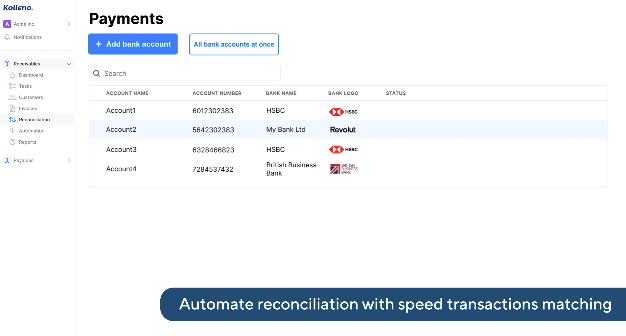
Kolleno is an AI-powered AR platform that automates collections, reconciliation, and payment tracking. It combines workflow automation with an AI agent that handles routine collection tasks. Kolleno's collections inbox consolidates all customer communications in one place, and that's a big improvement over the scattered email threads most AR teams deal with.
Why choose over Paystand
Kolleno automates the collections conversations that Paystand doesn't cover. The AI agent handles routine follow-ups, and the unified inbox keeps all payment communications visible in one place.
Key features
- AI agent support: Automate routine collection tasks and follow-up sequences.
- Collections inbox: Manage all customer payment communications in a single view.
- Auto-reconciliation: Match payments to invoices automatically.
- Workflow automation: Build custom collection workflows based on invoice age and risk.
Pricing
- Business Pay: $650/user/mo (Xero, QuickBooks, Sage Intacct integration)
- Business Plus: $1,245/user/mo (adds auto-reconciliation, AI agent, analytics)
- Enterprise: Custom pricing
Rating
G2: 4.9/5 (99 reviews)
Pros
- Unified collections inbox eliminates scattered email threads.
- Highest G2 rating on this list at 4.9/5.
- Auto-reconciliation reduces manual matching work.
Cons
- Per-user pricing gets expensive at larger team sizes.
- NetSuite and SAP integrations require the Enterprise tier.
- It's got a smaller customer base than more established tools.
10. Invoiced
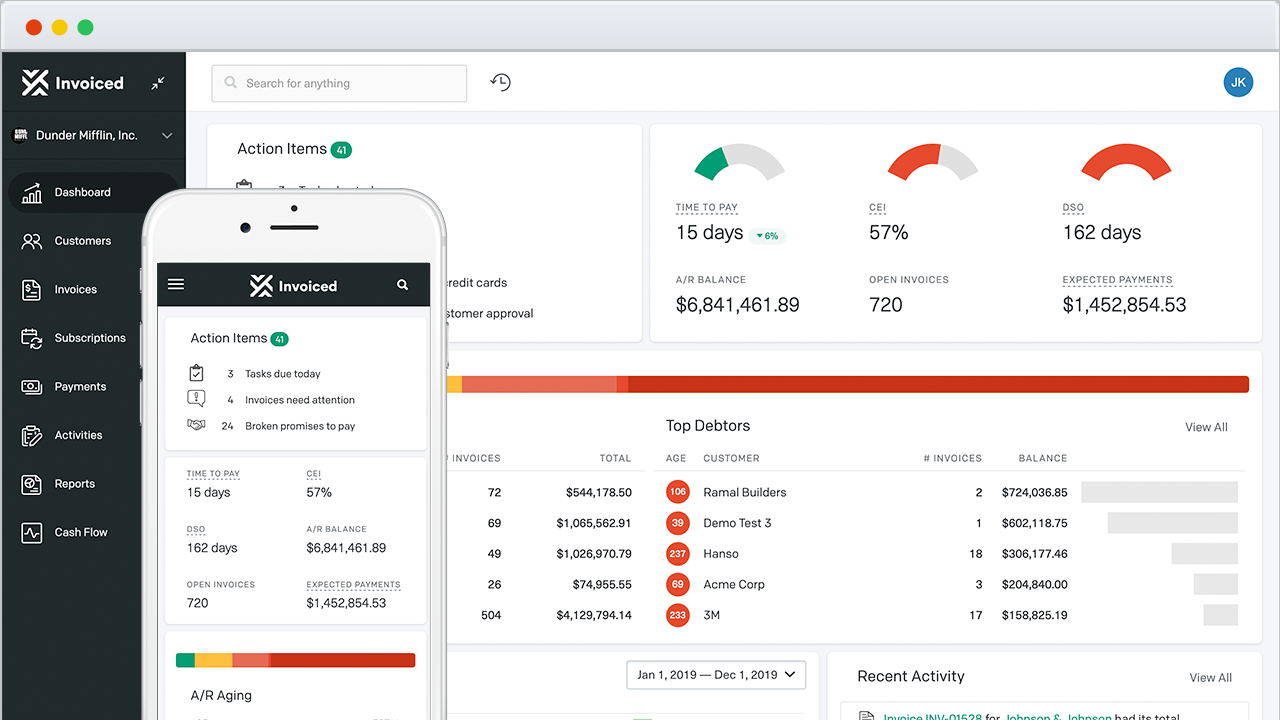
Invoiced (now part of Flywire) is an AI-native invoice-to-cash platform covering billing, collections, payment processing, and cash reconciliation. It automates the path from invoice creation through payment application. Its AI learns from historical data to optimize when and how it follows up with each customer.
Why choose over Paystand
Invoiced covers the full invoice-to-cash lifecycle with AI-driven optimization. Paystand focuses on the payment transaction itself. If you need automated billing, smart dunning, and cash application working together, Invoiced connects those steps.
Key features
- AI-driven collections: Optimize collection timing and messaging based on customer payment behavior.
- Automated billing: Generate and deliver invoices through multiple channels.
- Cash application: Match incoming payments to open invoices automatically.
- Payment flexibility: Accept ACH, credit card, wire, and international payments.
Pricing
Invoiced doesn't publish pricing since its acquisition by Flywire. Plans are quoted per account through the sales team.
Rating
G2: 4.5/5 (405+ reviews)
Pros
- AI optimization adjusts collection approach per customer automatically.
- Covers the full invoice-to-cash workflow in one platform.
- Strong G2 rating with one of the larger review bases on this list.
Cons
- No public pricing since the Flywire acquisition.
- Implementation can take longer if your ERP setup isn't straightforward.
- It's better suited for mid-market and enterprise than small teams.
11. Tabs
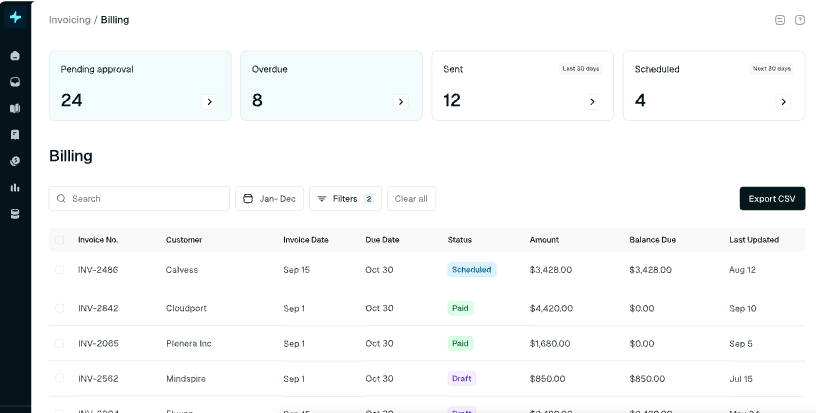
Tabs is an AI-native revenue platform that automates the contract-to-cash lifecycle for SaaS companies. It uses AI agents for billing, collections, and revenue recognition, all included at every tier. It integrates with QuickBooks, NetSuite, and Sage Intacct, and it'll handle complex SaaS billing models like usage-based and hybrid pricing.
Why choose over Paystand
Tabs covers the entire contract-to-cash cycle, from contract processing through revenue recognition. Paystand handles B2B payments but doesn't manage contracts, complex billing models, or RevRec. If you're a SaaS company, Tabs solves problems Paystand wasn't built for.
Key features
- AI collections agent: Automate follow-ups and prioritize outreach based on invoice risk.
- Contract processing: Extract terms and billing schedules from contracts automatically.
- RevRec (ASC 606): Automate revenue recognition across standard and usage-based billing.
- SaaS billing: Handle subscription, usage-based, and hybrid billing models.
Pricing
- Launch: $2,000/mo (up to $5M revenue, 100 active contracts)
- Growth: Custom (up to $20M revenue, 500 contracts)
- Scale: Custom (up to $50M revenue, 2,000 contracts)
- Enterprise: Custom (unlimited)
Rating
G2: 4.8/5 (95 reviews)
Pros
- AI agents included at every tier with no extra cost.
- Covers billing, collections, and RevRec in one platform.
- Handles usage-based and hybrid SaaS billing, not only flat subscriptions.
Cons
- Built specifically for SaaS, so non-subscription businesses won't fit.
- The Launch tier starts at $2,000/mo, which prices out smaller teams.
- Everything above Launch is custom-priced, so budgeting past $5M revenue needs a sales call.
Selection criteria
How we evaluated
We compared these 11 tools on the factors that matter most when you're moving off Paystand. We looked at collections workflow depth, AI and automation capabilities, ERP integrations, pricing transparency, and customer reviews on G2 and Capterra.
How to choose
If your team's biggest pain is chasing replies and tracking promises, Lunos handles the two-way conversation. If you need cash flow forecasting to inform treasury decisions, Tesorio's built for that. Enterprise teams on SAP or Oracle should look at HighRadius or Billtrust. Small businesses on Xero or QuickBooks will get running fastest with Chaser. And if you need AP and AR in one tool on a transparent budget, BILL's the simplest entry point.
FAQs
What is the best Paystand alternative?
It depends on what you need. For AI-powered collections that read and respond to customer emails, Lunos is the strongest option. For cash flow forecasting, Tesorio stands out. For enterprise-scale order-to-cash, HighRadius and Billtrust are the most established. It'll depend on whether your biggest gap is payment processing, collections automation, or both.
Does Paystand charge transaction fees?
Paystand doesn't charge per-transaction fees for payments made through its blockchain network. Payments processed through traditional credit card or ACH rails still carry standard processing fees. The zero-fee model doesn't apply unless both sender and receiver use the Paystand network.
Can I use Paystand alternatives with NetSuite?
Most tools on this list integrate with NetSuite. That includes Lunos (Growth tier and above), Tesorio, HighRadius, Versapay, Billtrust, Kolleno (Enterprise tier), and Tabs. Check each tool's integration depth, because some offer two-way sync while others only pull data one way.
What's the difference between a payment platform and AR automation?
A payment platform processes transactions, getting money from point A to point B. AR automation covers the full receivables workflow, invoicing, follow-ups, dispute management, cash application, and reporting. Paystand leans toward the payment side. Most alternatives on this list focus on the AR workflow, and several handle both.
Which Paystand alternative is right for you?
Paystand's payment network solves a real cost problem for B2B transactions. But if your AR team spends more time chasing replies and reconciling payments than processing them, you need a tool built for the full collections workflow.
Start with Lunos for free and see how AI-powered collections can cut your DSO without adding headcount.
Make your receivables effortless and focus on what you do best